An operating system for the sales team, built on Bitrix24

- 381
- releases in four months
- 3,100
- automated tests
- 199K
- lines of TypeScript
- 0
- manual Excel reports
Sales Control is a sales analytics app for the sales team: sales rep KPIs in Bitrix24, plan vs actual by day and a forecast at the current pace. Sales automation replaced manual Excel reports and hand-counted calls.
Four months of work by one developer
- 952
- commits
- 32
- end-to-end scenarios in Playwright
- 174
- SQLite tables for mirrors, logs and queues
- 65
- permissions across seven roles
What the app can do
Six chapters in the same order as the app menu. Scroll down: the camera moves across each chapter’s main screen and stops at the key elements.
Overview
Planning
Company card
Tasks
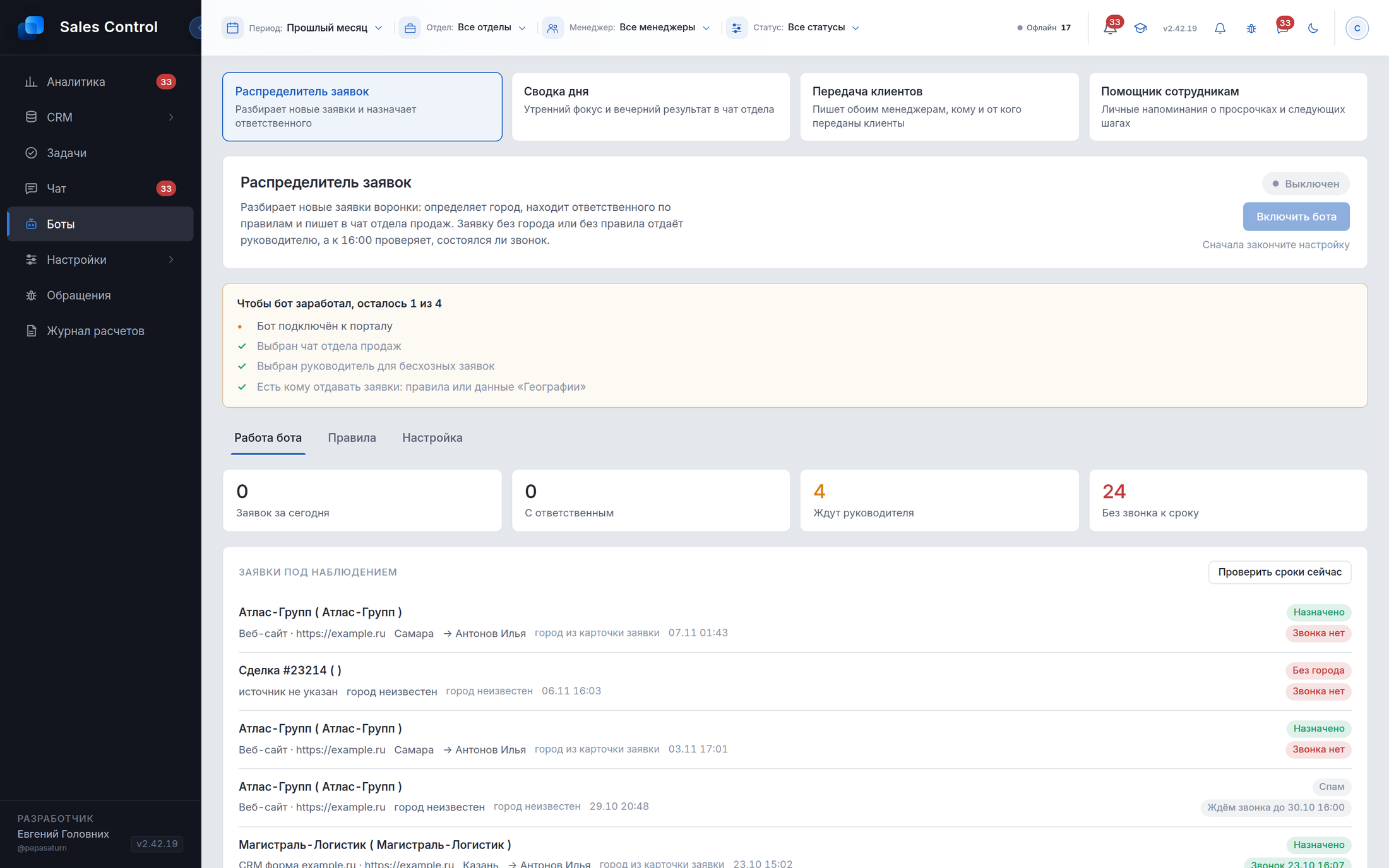
Bots and assistant
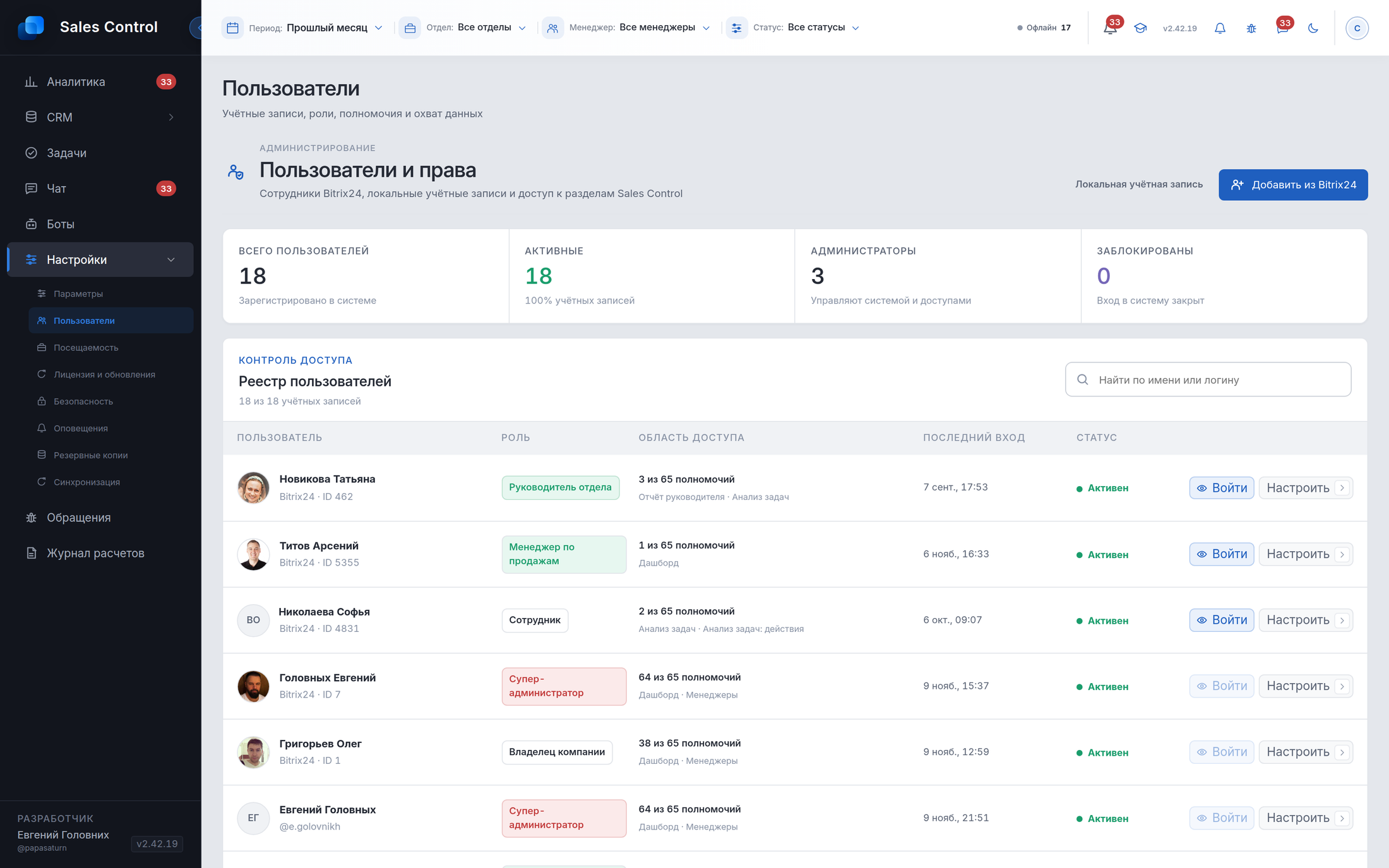
Users and permissions
Every section of the app
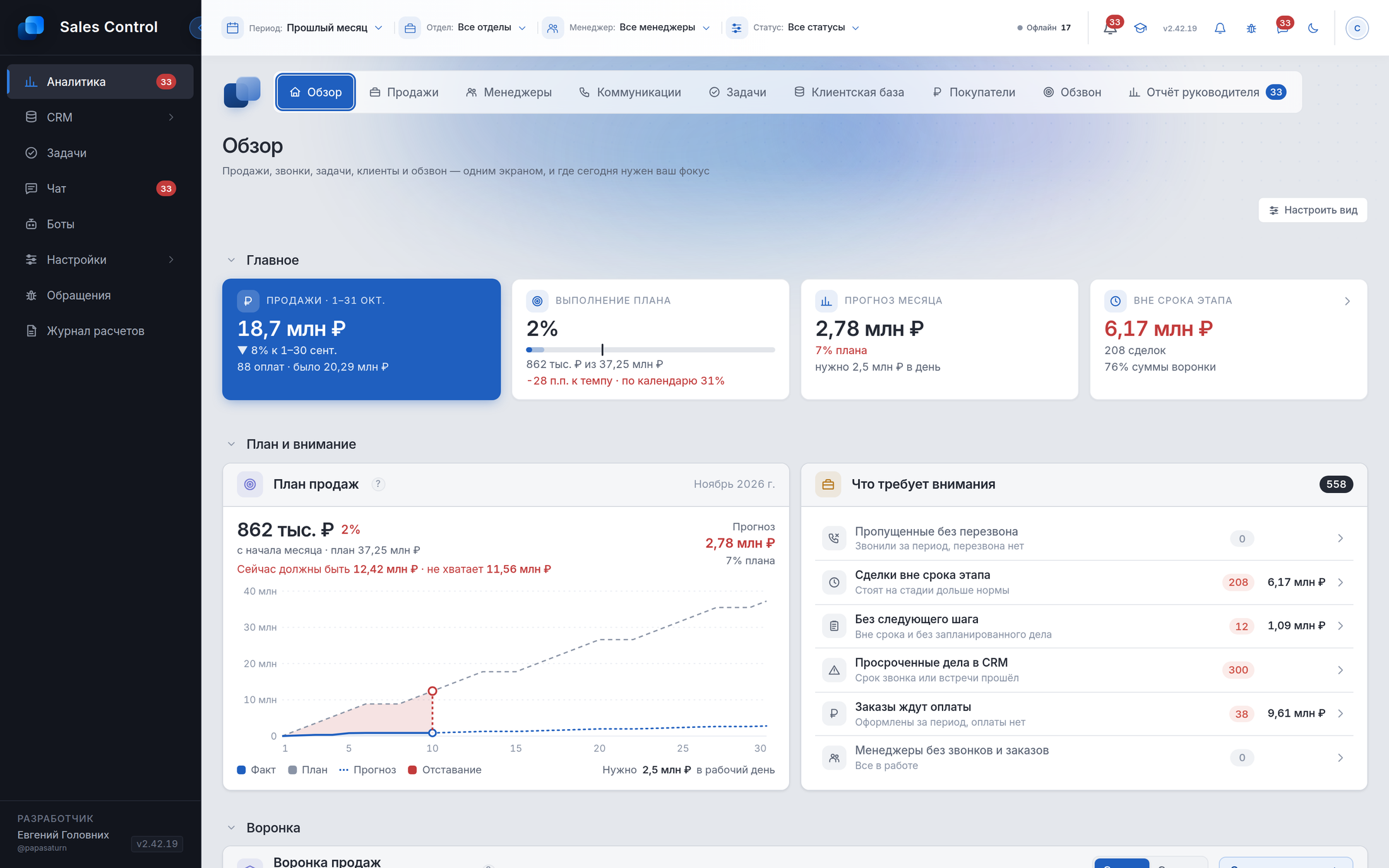
Overview10
Team performance and today’s management priorities
- Headline tiles: paid, plan progress, month forecast by pace, deals past their stage deadline
- “Sales plan”: cumulative actuals vs plan by day, the gap and how much to sell per working day
- “Needs attention”: missed calls without a callback, deals with no next step, overdue activities, orders awaiting payment
- A funnel across all portal stages, a “loss funnel”, loss reasons and the stage after which deals are lost
- Average age of an open deal and “longest at stage”
- 30-day payment forecast: the payment probability of each order based on 12 months of payment history
- “Manager actions”: a priority-scored queue with “Open in CRM” and “Hide until next working day”
- Plan by sales rep and “Team today” cards that open the rep’s profile
- “Change vs previous period”: payments, orders, average order, calls, call effectiveness, losses
- Optional blocks: sales dynamics by hour and day, “Money and losses”, “What changed” since a saved baseline
Sales7
Orders and payments, delayed payments and rep performance
- Summary: paid, orders and average order, conversion to payment by count and by money, total losses
- Written takeaways like “small orders get paid, large ones wait”
- “Do this now”: expected payments and reps with deviations
- “From order to cash”: an “Ordered → Paid” funnel and a breakdown of order value
- Dynamics by hour or day, by count or roubles, cumulative and with a previous-period line
- “Results by rep”: team share, paid, awaiting payment, conversion, losses, signal
- Clicking a rep shows their orders, average payment and losses; “Awaiting payment” opens the deal register already filtered
Sales reps8
Each rep’s state: KPIs, plan, deviations and review priority
- Team summary: on track, needs attention, confirmed sales with change vs previous period
- Segments “Needs attention”, “Inactive”, “Leaders” and “Former”, plus search
- Two views, “Cards” and “Full analytics”, with each rep’s KPI profile and main signal
- Rep profile: summary (strength, main risk, next step, manager’s decision)
- Actuals vs daily targets for calls, minutes, clients and deals; signals with cause and recommended action
- Call register with recording playback, and calls that led to a sale
- “Workday rhythm” by hour with breaks and lunch; week and month comparison
- Manager comments and a “View as rep” button that opens the rep’s workspace with their permissions
Communications7
Rep calls and emails to clients: volume, quality, pending replies
- Summary: client calls, talk time, qualifying calls, emails, clients without a callback
- Call dynamics by hour or day, by count or minutes
- “Conversation quality”: with a CRM action, linked to a sale, zero-length, short, internal
- Per-rep table: calls, minutes, effectiveness, whether the first call was on time, email volume
- “Missed without callback” with recording and a link to the CRM card
- Call register: quick slices, filters by type, result, quality, CRM link and duration, built-in player
- Email register by rep and direction, with sent and received totals
Tasks analytics6
Bitrix24 task backlog and employee workload
- Urgent right now: overdue by assignees and awaiting acceptance
- For the period: created and closed, on time, median completion and delay, tasks without a deadline or CRM link
- Daily task flow with accumulated backlog
- Workload by department and person; backlog and acceptance by assignee
- A “Departments / Projects / Assignees / Creators” breakdown: a click opens those tasks in the Tasks section
- Scope by permission: own tasks, department, department with sub-departments, or the whole portal
Client base analytics6
Size, completeness and quality of the CRM database
- Volume: companies, contacts, deals and leads, with trends from daily snapshots
- Quality score and counters: invalid emails, suspicious phones, no owner, possible duplicates, repeated tax IDs
- Completeness: companies without contacts, contacts without a company, which fields are filled
- Client mailbox and website checks, with results and findings by day
- Rep portfolios and a regional summary
- Almost every metric is clickable and opens the CRM with the matching filter applied
Buyers6
Buying clients, payments and open-deal value
- Metrics: companies, repeat buyers, lifetime paid, open-deal value
- Segments: active, untouched, inactive, lost-only, not enough history
- Client value rating from 0.5 to 5 stars based on won-deal value
- Client register: last contact, purchases, paid for the period and lifetime, open deals
- “Growing first / declining first” sorting compares payments with the previous period
- Client card with lifetime deals and payments and links into the CRM
Call campaign analytics4
Results of all call campaigns: today, this week and per campaign
- Today: calls vs plan and yesterday, reach rate vs norm, agreements with value, overdue promises
- Weekly call chart and a “In base → Processed → Agreed” funnel
- Campaign table: coverage, attempts, reach, conversion, callbacks, refusals, potential in roubles, last call
- The best campaign by conversion is highlighted; a click opens its report
Management report7
Department monthly plan completion, plan approval and report acceptance
- Monthly documents register: awaiting decision, closed, late, average plan completion
- Monthly plan in 4 steps: department commitment, goals with criteria, tasks from Bitrix24, review
- The report is built from the approved plan: actual results come from Bitrix24, deviations need reasons
- Approve, accept with a grade, or return with a mandatory comment; version history
- Discussion of the document and individual tasks, “Questions to management” with decision status
- Schedule: author, reviewer and a single reporting day per department
- Export the whole document to PDF
Across all analytics8
Period, comparison, layout and real-time updates
- One “Analytics” menu item with tabs; which tabs you see depends on your permissions
- Period presets: today, yesterday, 3/7/14/30 days, week, month, quarter, a specific date or a custom range
- Filters by department, sales rep and status
- Comparison with the previous period is automatic: the same slice of the week, month or quarter
- “Customize view”: reorder and hide blocks, custom sections, blocks per row, density; the layout is saved per user
- Every metric has a tooltip with its formula and data source
- “How it’s calculated”: the source records behind a metric, paginated, with a “shown = recalculated” check
- Deal, task and campaign changes arrive from Bitrix24 in real time, with no page reload required
My results6
“How my manager sees me”: personal KPIs, plan and today’s to-dos
- Calls, deals, orders and sales for the period, with the calculation method
- A three-part KPI score: activity, results vs plan, discipline
- Progress on the personal monthly sales plan
- Workday map and charts by hour or day
- “Call back” and “Deals with no next step” with “Call / Email” buttons via Bitrix24
- “What your manager will raise”: deviations from targets sorted by KPI impact
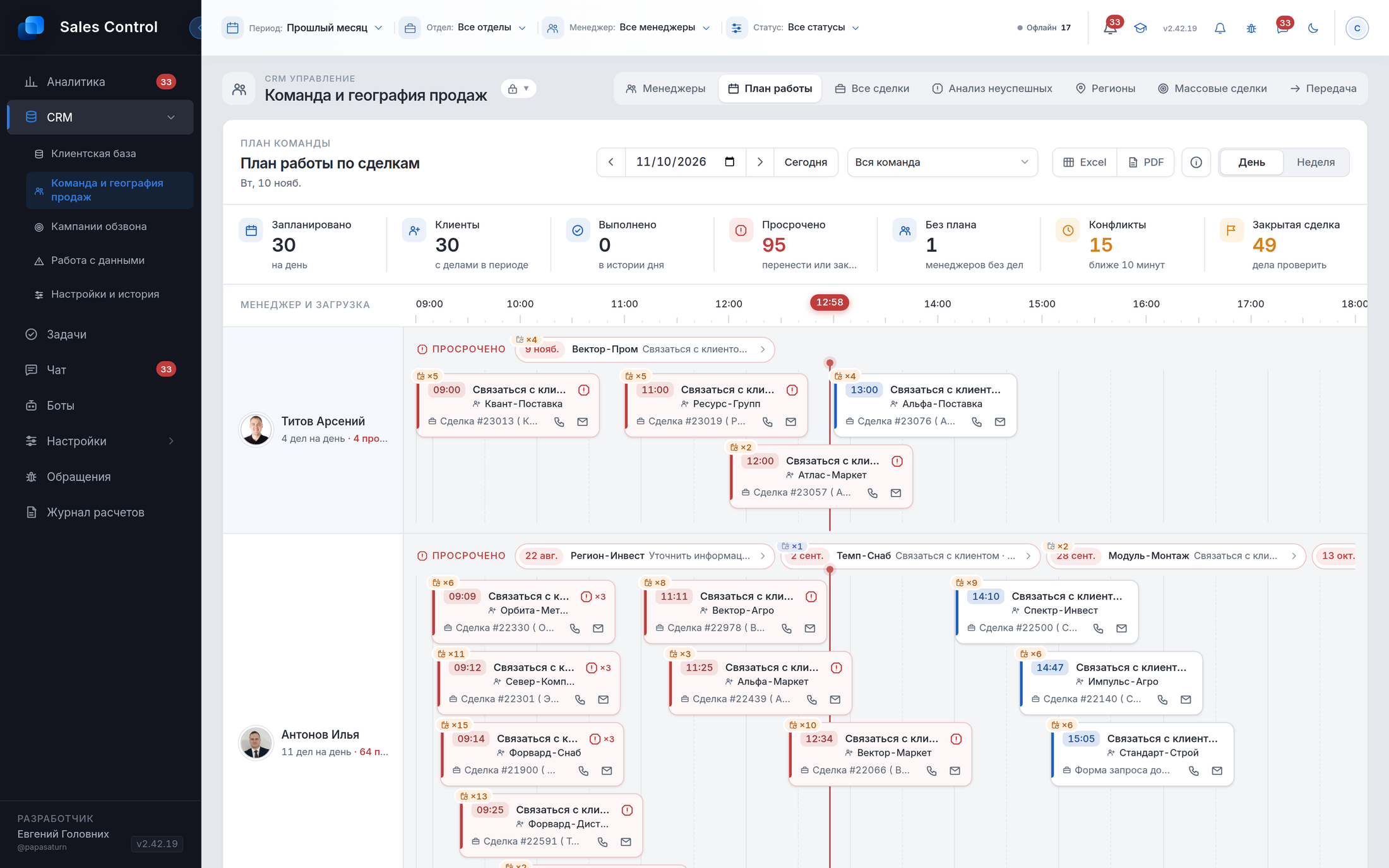
Planning7
Personal workday and next steps on your own deals
- Personal deal register as a table or funnel, with filters by stage, client, city and activities
- Counters: priority, no activity scheduled, idle 7+ days, awaiting payment, time in funnel and at stage
- A Day / Week calendar on a 10-minute grid: dragging an activity moves its due date in Bitrix24
- Auto “Distribute the day” and conflict highlighting for activities under 10 minutes apart
- “Prioritized day plan”: free slots that respect the schedule, absences and lunch; callbacks and overdue items first
- Schedule a call or move an activity in a single action; the change goes straight to Bitrix24
- Export the register and plan to Excel or PDF
CRM database7
A register of companies, contacts, deals and leads from the Bitrix24 mirror
- Search by ID, name, tax ID, city, phone, email and owner
- A “field, operator, value” filter builder and a client-value star filter
- Any columns, including custom fields; reorder and resize by dragging
- Saved views: filters, columns and sorting under a name
- Each row shows website availability, mailbox status and record completeness
- Bulk actions: transfer, save as segment, change a field, mark for deletion
- Register state is stored in the URL, so links can be shared and the Back button works correctly
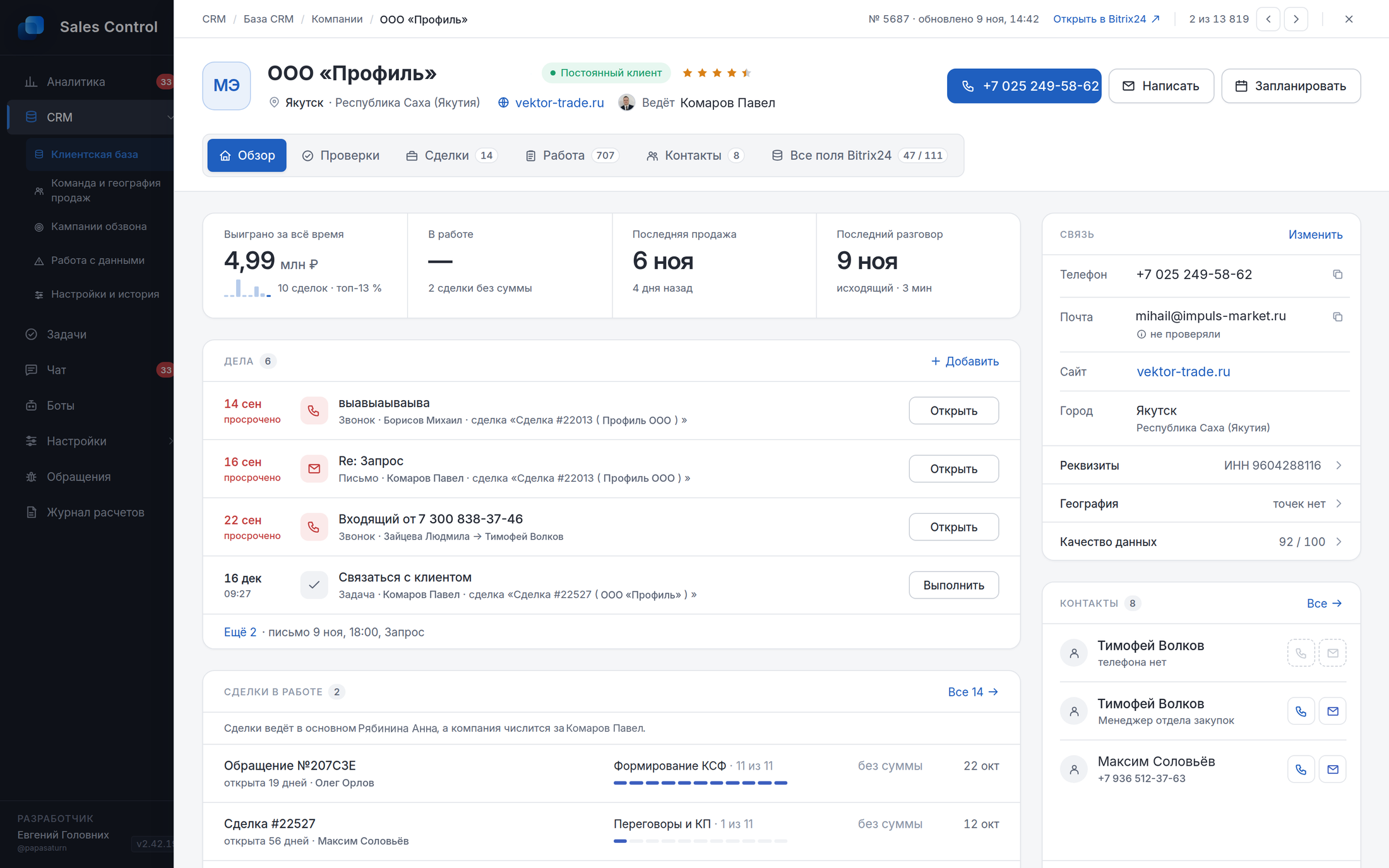
Company card8
Everything about a client without opening Bitrix24: overview, checks, deals, activity, contacts, all fields
- “N of M” paging through the selection, client status, calling via Bitrix24 telephony, “Email”, “Schedule”
- Overview: lifetime won, in progress, last sale and call, activities, deals by funnel
- A hint when the deal owner differs from the company owner
- Checks: client website and mailbox, website data compared with Bitrix24 and a decision for each row
- Deals: won, open, lost, conversion, average deal, deal cycle, monthly trend
- Activity: calls, emails, meetings and tasks by day, with filters, recordings and missed calls
- Contacts with phones and email; geography with locations from the website and writing the main one to Bitrix24
- All Bitrix24 fields, with search and hide-empty
Deals and pipeline8
Deal register, kanban, deal card and stage automation
- Register with filters by funnel, stage, owner, activities, “Sales lead control” and “Awaiting payment”; export to Excel and PDF
- Kanban: dragging between stages saves the stage to Bitrix24 and immediately requests the stage’s required fields
- Create a deal right from the board; customize how cards look
- Stages and loss reasons can be renamed, recoloured, reordered and added, with changes saved to Bitrix24 immediately
- Deal card: change stage with confirmation, close with a reason, edit fields and amount
- Fields and stage go to the portal in one call, which prevents partially applied changes
- Drag-and-drop files, activities, a feed of calls and comments, time spent at each stage
- Automation: on entering a stage, create an activity for the owner or email the client, with a run log
Segments and wizards5
Saved client selections and step-by-step scenarios for common jobs
- Segment builder with AND / OR conditions and a live “matches now” count
- Quick starts: no tax ID, no owner, not updated in 90 days
- Dynamic segment or static snapshot; visible to the department or only to you
- “Out of date” flag, recalculation, archive and bulk operations on a segment
- Wizards with steps, outcome and required permission: transfer, cover, de-duplication, routing rule
Sales team and geography9
Rep portfolios, regions, client handovers and bulk deals
- Rep portfolios: companies, active clients, won, open deals, geography, data quality
- Rep panel: money by region, top clients, clients with growth and decline, client handover history
- Regions: territory ranking, companies without a region or owner
- Hand over a portfolio, region, city, company or selection together with contacts, deals and leads, with progress tracking and cancellation
- Calculate permanent handovers and temporary cover, with return simulation and schedules
- Bulk deals: clients by region or segment → a deal → a task for the rep, at once or 30 a day
- Bulk-deal monitoring every 10 seconds and cancelling the remaining batches
- Team work plan by day and week, with rescheduling and automatic distribution
- Lost-deal review: reason, sales lead’s decision, process violations and “Return to work” with a new activity
Call campaigns: setup8
A 5-step wizard: goal, who to call, who calls, what to say, review
- The draft is saved at every step, so you can close the wizard and come back later
- Audience by segment, city, region, owner, or a condition builder over any CRM field
- A real-time “N of M will be called” count with reasons for exclusion
- “Do not call” rules: missing or invalid phone, already in another campaign, open deal, do-not-call flag
- Client distribution: shared queue, round robin or by owner; daily call target per rep
- Call script, objections, and the funnel and stage for deals created from calls
- A pre-launch checklist with “Fix” buttons; the client list is frozen at launch
- Add clients manually or import from CSV, retry intervals for no-answer, change log
Call campaigns: calling9
The rep workspace: queue, client card, script and call outcome
- The server hands out the next client and locks them to the rep while they work
- Client’s local time with an “after hours” flag, number choice, decision-maker first
- Client essentials: latest comments, average order, purchases by month, days since last contact
- Calling through the Bitrix24 softphone, plus auto-dial with a countdown
- Script with answers captured during the call, objections and reference materials available during the call
- Two-step outcome; mandatory “Next step” and “What was agreed”; keyboard shortcuts
- Callback promises: “In 2 hours”, “Tomorrow 10:00”, “In a week” and more
- “Create deal” in Bitrix24, change stage and amount, activities, send a proposal via the portal email editor
- A new phone, email, contact or decision-maker is added in Bitrix24 next to what is already there
Call campaigns: control9
Campaign list, team, reports and call review
- Campaign list: calls today, reach, agreements, overdue promises, progress and potential
- Lifecycle: draft → active ⇄ paused → finished or archived
- “Needs attention”: overdue promises, a rep with reach below the team, proposals unanswered for 3+ days
- Campaign contacts: status filters, bulk assign, bump in queue or exclude, export
- Reps: on a call or offline, “Not calling for N hours”, uneven-workload warning
- The script has versions and answer statistics showing at which question conversations end
- Report: call funnel, outcomes, objections, best hour, breakdown by city, region and turnover
- Call log and manager review with a grade and “show the team as an example”
- Send the report by email with a PDF attached
Data quality8
Cleaning the client base: quality, duplicates, phones, names, email, owners
- Quality centre: issues grouped into “Fix first”, “Duplicates”, “Empty fields”, with on-demand checks
- Duplicates by email, phone, tax ID and similar name; a 3-step merge with value selection
- Uniform phone format: a template, extensions, foreign numbers
- Names: extra spaces, all caps, typographic quotes, legal form first
- Email: copy-paste artifacts, lower case, several addresses in one field, repeats
- “One owner per client”: contacts and open deals follow the company owner
- Geography review: decide once per spelling of a city; a “Region” field in Bitrix24
- Cleanup report: what was fixed and deleted, by day, and what is left
Record enrichment7
Checking client mailboxes and websites and reviewing what was found
- Email verification without sending: syntax, the domain’s mail server, whether the mailbox exists
- Batch checks from a list, the CRM or a segment, with limits, pause and resume
- Website checks: working, placeholder, access blocked, unreachable
- Phones, emails, addresses, messengers, social profiles and people are found on the website
- Findings await a user decision; only accepted ones are written to Bitrix24
- Parser tuning: non-client domains and values excluded from suggestions
- Bounce processing from a mailbox: no mailbox, no domain, full, temporary failure
Safe writes to Bitrix247
Controlled changes to the production CRM
- Write modes: read-only, client handovers only, or full write
- Every bulk edit: “before → after” preview, confirmation, a queue and a per-record log
- Failed records can be retried and the whole run rolled back, after verifying the field has not been changed by other users
- Two-stage deletion: mark without touching the portal, then “Delete forever” or “Restore” under a separate permission
- Before marking you see what is linked; you can mark only records with no links
- Database control rules: templates and a builder, “observe” and “recommend” modes
- Operations log with live progress, and a city and region directory
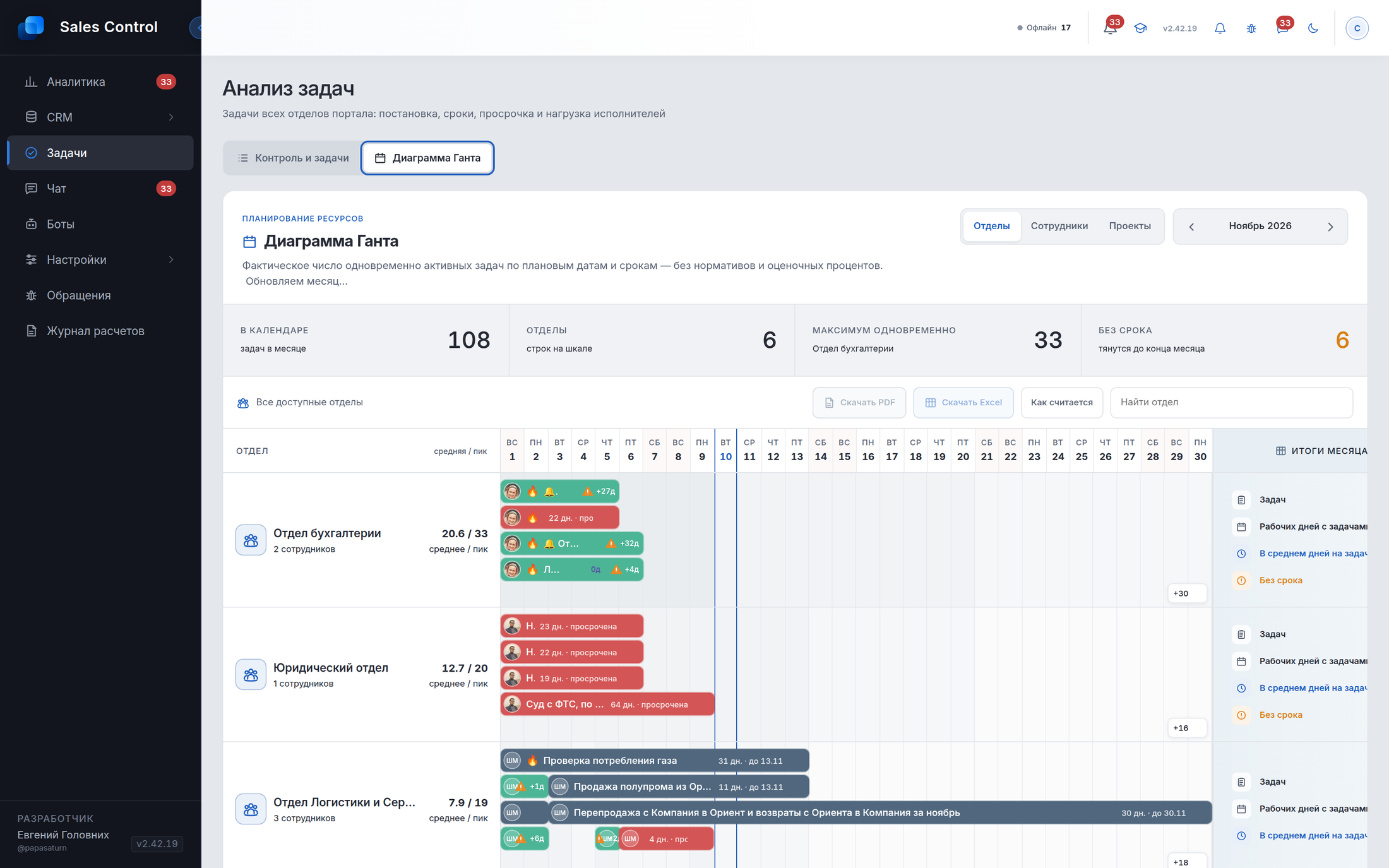
Tasks8
Real-time control of Bitrix24 task execution
- “Under my control”: a log of manager interventions and how each ended
- Register with filters by department, project, creator, assignee and deadline; quick slices like “Older than 30 days”, “No movement for 14+ days”
- Single and bulk actions straight in Bitrix24: accept, return, complete, deadline, reassign, priority, observer
- Bulk action results as “N of M”, with the portal’s reasons for failures
- Gantt chart by department, person and project: monthly load, peak concurrency, tasks without a deadline
- Export the Gantt to a multi-page PDF and to Excel
- Deleted-task history: who deleted it, when and with what deadline
- Pop-up alerts on status, deadline or assignee changes, and a summary to Bitrix24 on demand
Department plans and reports6
The monthly cycle: plan, report, review and grade
- Schedule: author and reviewer per department, a single reporting day moved off weekends and holidays
- Plan: commitment, goals with criteria, tasks from Bitrix24, risks, dependencies, questions to management
- Report against the approved plan: grading tasks and goals, reasons for deviations, carrying over unfinished work
- Tasks added after the plan was approved are flagged separately
- A “stamp” on the document: approved, accepted, with remarks, plan not met
- Reminders to the author on reporting day, in chat and by email
Chat5
A built-in work messenger with threads on tasks, plans and sales
- Direct and group chats, with categories like “Tasks”, “Plans and reports”, “Sales and analytics”
- Edit, reply, reactions, pinning, typing and read indicators
- Files, voice messages, link previews and mentions
- Attach a deal, task, plan or note to a message
- Chat notes: agreements and deadlines visible to all participants
Bots and assistant7
Bots in Bitrix24 chats: lead routing, digests and reminders
- The lead router finds the city through “deal → contact → company → address” and picks a rep
- Region and city rules with a primary and backup rep; “Suggest” and “Assign automatically” modes
- Checks that each lead was called by a set time, using the working calendar, plus a “Spam” button
- Daily digest to the sales chat: morning focus and evening results
- The assistant answers “what’s on today”, urgent items, sales, calls; managers get a management digest
- Quiet hours; a missed call immediately raises queue priority
- Notifications to reps about client handovers
Notifications and feedback6
Push, email, “Report a problem” and joining a colleague’s screen
- Channels: desktop push, the Bitrix24 bot, chat and email
- “My notifications”: “Immediately”, “In the morning digest” or “Never” for each type
- System health alerts: mirror lag, event queue, disk space, backups
- “Report a problem”: category, impact, an annotated screenshot with blurring, technical context collected automatically
- “My reports” with statuses, and a “Feedback” section for the admin
- You can join a colleague’s screen to watch, guide or take control; they see it and can end the session
Users and permissions6
7 roles and granular permissions enforced on the server
- Add a Bitrix24 employee or a local account with a temporary password
- A role is a preset you fine-tune with toggles that explain “what it opens” and “why it’s risky”
- Deletion, rollback and restore can only be granted one by one
- Task scope: own, department, department with sub-departments, all
- “Sign in as” an employee to check their view, for up to 2 hours
- Usage: time in the app and sections per person, IP history and IP blocking
Security5
Sign-in and session policy, brute-force protection, event log
- Session length, idle timeout and minimum password length
- Growing delays after failed sign-ins, with “Lift the delay”
- Active sessions with device and address; “End all except mine”
- Log: sign-ins, permission and password changes, “sign in as”
- Sign in with username and password, or through the Bitrix24 embed
Sync and data6
A local Bitrix24 mirror and transparent calculations
- The portal connects via a checked webhook, no restart needed
- Mirror of deals, stage history, tasks, calls, CRM activities and work time
- Portal events through a retrying queue, plus a reconciliation pass to fill gaps
- System self-check with control queries
- Calculation log: who refreshed data and when, how many calls and deals, where data was missing
- KPI settings: targets, weights, formula, working hours, a monthly plan with “Last month +10%”, absences
Backups, updates, branding8
Encrypted backups, safe updates and branding
- Scheduled backups: daily and full, retention by day, week and month
- AES-256-GCM encryption and verification right after writing
- Restore with a preview of what will be added and overwritten
- Updates: signature check, automatic backup, install, health check and rollback on failure
- License: plan, user limit, expiry
- Custom app name, logo and one of 6 colour schemes
- Company mail server, a “who gets what” matrix and a delivery log
- Built-in training: 21 interactive courses that highlight UI elements
Initial sales team challenges and results
No record of the last client contact
Each client now shows how many days have passed since the last contact. Companies without recent contact are added to the call queue automatically.
Stalled deals went unnoticed
The funnel shows how long a deal has sat at its stage and after which stage deals are lost.
Follow-ups were a formality
For every rep you see deals with no next step and overdue activities.
Large deals were lost in the general list
Idle deals are listed first with their amount, and the manager reviews them one by one.
Calls were counted by hand
Calls are compared with the daily target. Effective calls and missed calls without a callback are counted separately.
Low CRM data quality
At the start 59% of companies had no deals, 4% had an address and 18% a tax ID. The app now cleans up duplicates, phones, emails and cities, and every change can be rolled back.
A few more screens
Client websites as a data source
Finds contacts
Phones, emails, address, messengers, tax ID and staff with job titles. It reads the home page and the Contacts page.
Filters out irrelevant data
Placeholder numbers from forms, web studio phones, hosting emails and invalid tax IDs are never suggested.
Accounts for branches
When a company has several offices, it takes the contacts of the one in the client’s city.
Learns from rep feedback
Mark a number as a web studio phone once and it will not be suggested again.
Checks email without sending
It checks the syntax, the domain’s mail server and the mailbox itself, and reads bounces. If the server gives no definitive answer, the result is marked “undetermined”.
Does not change data automatically
Findings stay as suggestions with a link to the source. A person adds them to the CRM.
Under the hood
A local copy of Bitrix24 data
The app keeps its own copy of deals, tasks and calls and checks it against the portal every hour. Reports open in seconds and never hit Bitrix24 limits.
Reliable change delivery
Portal events go into a queue that persists across server restarts and retries failed operations.
Automatic screen updates
Deal changes in Bitrix24 are reflected in the app immediately. No reload needed, and permissions are checked on every update.
Two ways to sign in
A username and password in the browser, or straight from inside the Bitrix24 portal. A session lasts 12 hours.
Bulk edits you can undo
Before anything is written you see what was and what will be. The edit waits for confirmation, is logged and can be undone in a single action.
Backups and safe updates
Backups are encrypted. If a new version fails its checks after install, the system automatically rolls back to the previous one.
Management questions that now have answers
Sales
Will we hit the plan and how much do we need per day? Which deals are at risk? Where do we lose?
Reps
Who is working and who is idle? How many calls against the target? Why is a rep marked “At risk”?
Clients
Who haven’t we talked to in a while? Who buys the most and who is leaving? Who should we call first?
Company
How loaded are the departments? Who gets a departing rep’s clients? Who changed what in the CRM?
Four months, one developer, and the sales team no longer runs its reporting in Excel. I can build a similar tool for your processes.
Evgeniy Golovnikh
Updates
Latest updates
A new look and the management overview
A new look for the app and the sign-in screen, a reworked Overview, and a funnel with loss reasons and conversion based on closed deals.
Clients, emails and department reports
Client value ratings with growth and decline, a register of reps’ emails, department plans and reports by month.
Deal pipeline
A drag-and-drop kanban across stages and a new “All deals” register.
CRM cleanup
Tools for keeping the database in order: deletion via a bin, duplicates, uniform phones and emails.
Stack
Frontend
- React 19
- TypeScript
- Vite
- Recharts
- CSS Modules
Backend
- Node.js
- Express
- SQLite
- SSE
- Web Push
- pdfmake
Integrations
- Bitrix24 REST
- BX24 SDK
- imbot
Quality & delivery
- Vitest
- Playwright
- GitHub Actions
- nginx
- systemd
A similar task?