Brings two large client bases together without duplicates, links them by GUID and reconciles financial data in both systems

- 11K
- Bitrix24 companies searched to find and link the 1C clients
- 28K
- 1C orders, sales and returns matched to CRM clients
- 586
- automated tests verify the exchange
- 0
- cards merged without user confirmation
The problem
Bitrix24 duplicate companies and a separate client base in 1C
Over the years Bitrix24 had accumulated around 11,000 companies, and the same firm was often entered several times under different names. 1C had its own large client base, some clients with several legal entities. Orders and financial data were kept in 1C while sales reps worked in the CRM without seeing the real purchase history.
The standard exchange would create new duplicates and attach orders to arbitrary cards, and the client prohibited automatic merging. A tool was required to reconcile the two bases accurately without corrupting data in either.
The solution
Step-by-step matching
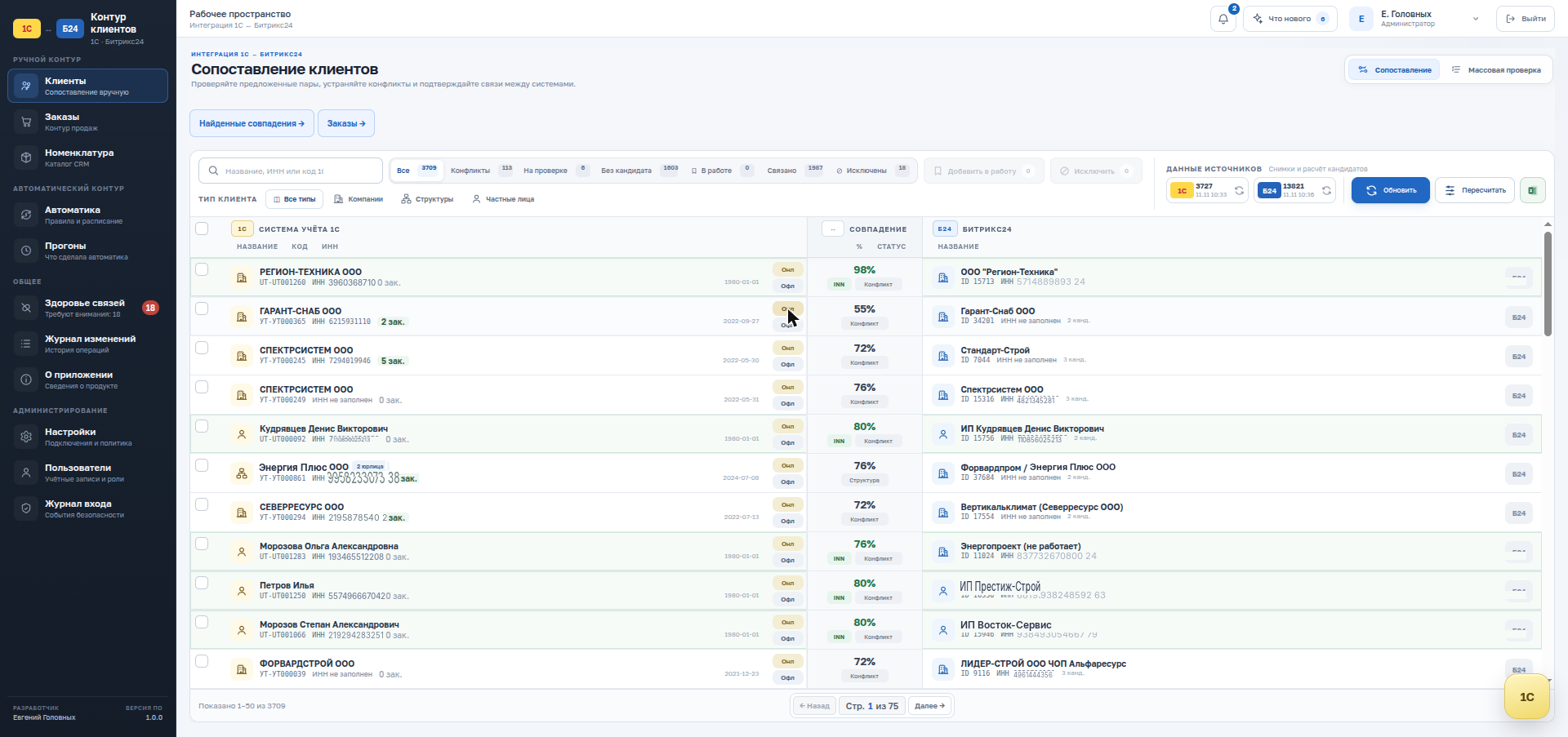
- Match: find Bitrix24 candidates for every 1C client and show the grounds for the match — tax ID, phones, emails, name
- Pick the right company: among duplicates a user chooses the correct card; the client’s other legal entities attach to it instead of creating new ones
- Link by GUID: the 1C partner GUID is written to the chosen company, and from then on the link is based on it, not on a name or phone
- Export past orders: the sales history moves from 1C into Bitrix24, so the financial figures in both systems match
Data checks → matching → GUID link
1. Snapshots
The app reads 1C (OData, read-only) and Bitrix24 into its own snapshots. Production systems are neither loaded nor changed, and every stage shows its progress.
2. Checks and scoring
Tax IDs, phones, emails and names are normalised, and every pair gets a match probability with an explanation of which signals matched.
3. GUID link
Once confirmed, the link is based on the 1C GUID and is unaffected by a rename, a new phone number or a typo.
Doubtful cases go to manual review
Only unambiguous matches are confirmed automatically. The rest go to a manual review queue with conflict filters and bulk actions.
Sections and capabilities
Four chapters in the same order as the app menu. Scroll down and the camera moves across the main screens, stopping at what matters most.
Client matching
Linking wizard
Pair decision
1C inside the app
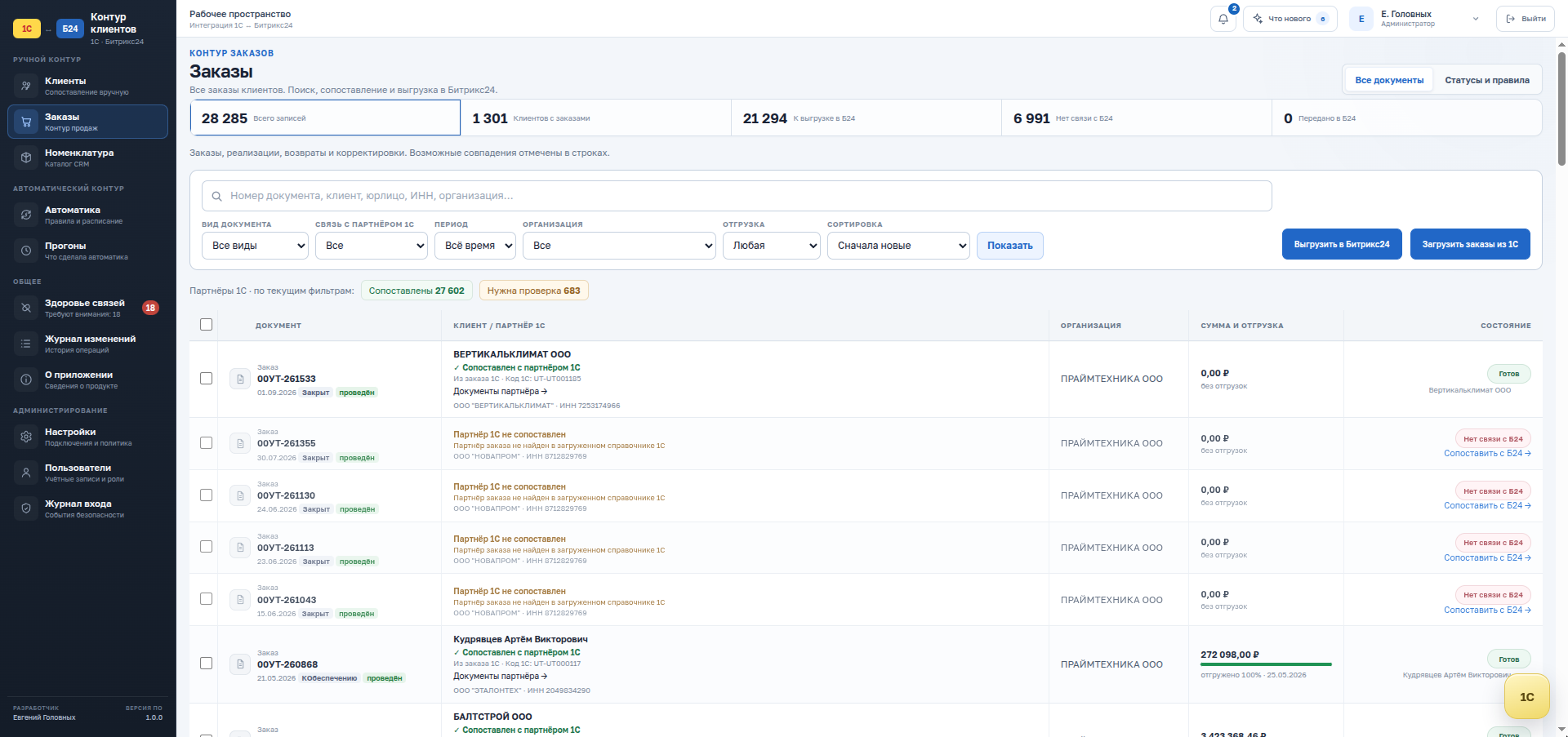
Orders
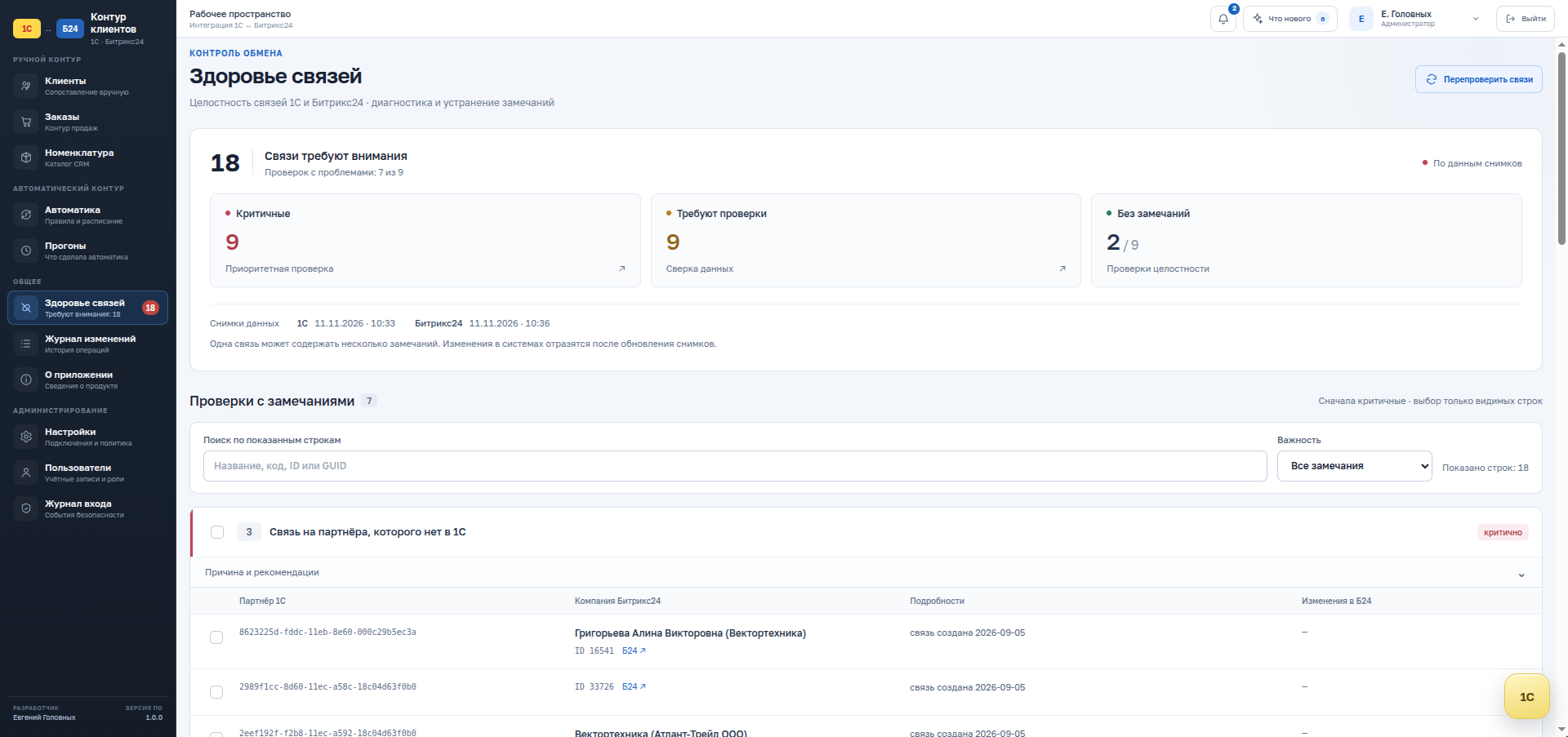
Link integrity
Every section of the app
Client matching9
1C partners next to Bitrix24 candidates, with the grounds for each match
- Every 1C partner with its code, tax ID, order count and type: company, private person or holding
- Bitrix24 candidates are found step by step: GUID, tax IDs, then phone and email
- A similar name only widens the candidate list and never confirms a pair on its own
- Match probability as a percentage, the rule that fired, matching and conflicting fields
- Filters: conflicts, under review, no candidate, in progress, linked, excluded
- Split by client type: companies, structures, private persons
- Bulk selection, “Add to work” and exclusion from matching
- Manual Bitrix24 company search for clients with no candidate
- Queue export to Excel
Linking wizard6
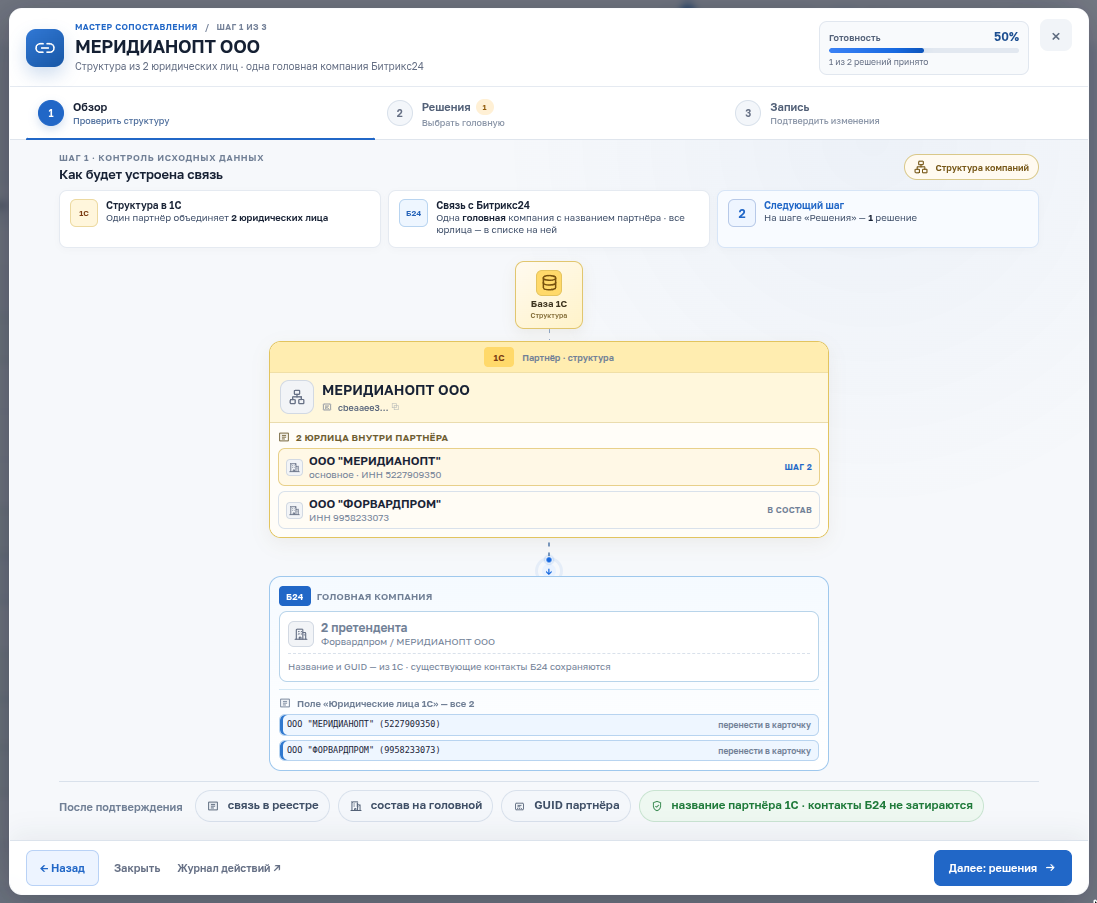
A 1C holding with several legal entities becomes one CRM company
- Three steps: structure overview, decisions, write
- A “1C partner → its legal entities → one Bitrix24 head company” diagram before anything is written
- The main entity becomes the head company; the others become items of a “1C legal entities” list
- If there’s no suitable company in the CRM — a “Create head company” button
- Readiness as a percentage: how many decisions are made
- After the write — a link in the register, the members on the head company and the partner GUID
Pair decision6
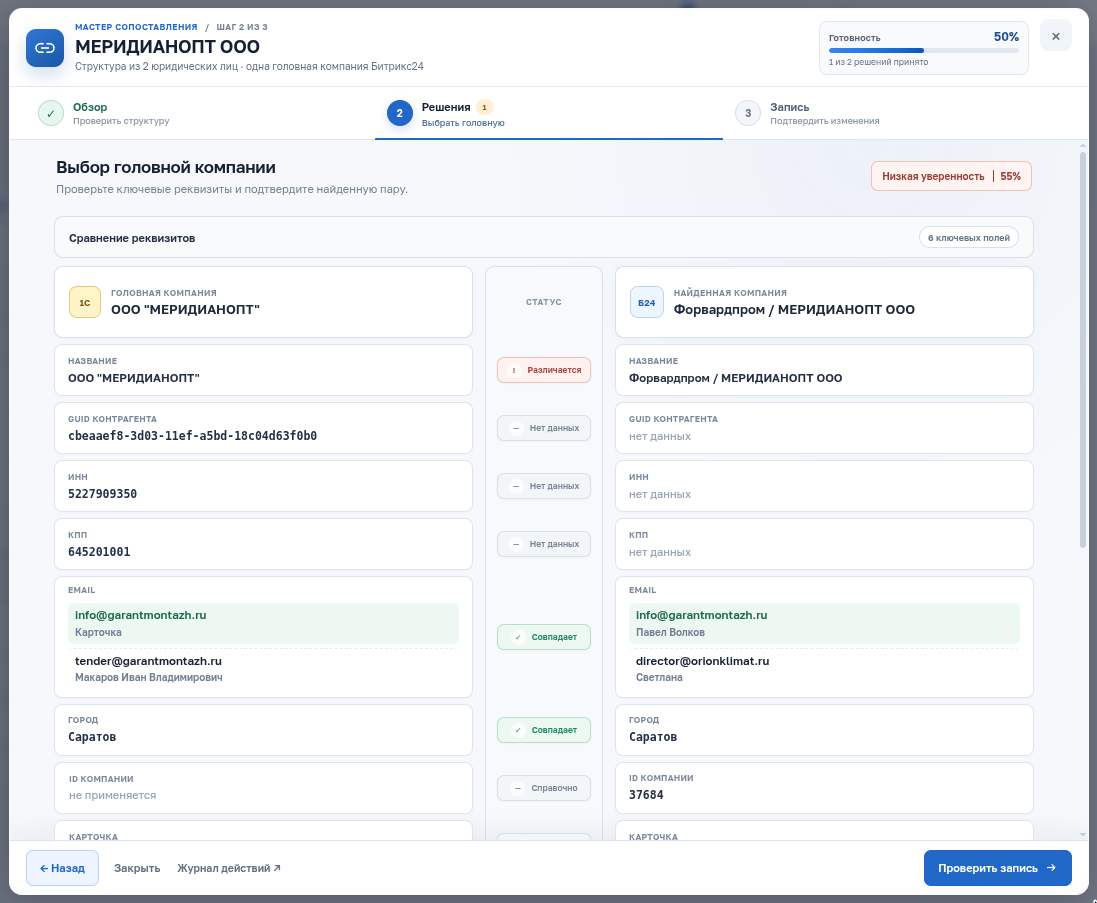
Field by field you see what matches, what differs and what’s missing
- Name, GUID, tax IDs, email, city, ID and card — side by side from 1C and Bitrix24
- Each field’s status: “matches”, “differs”, “no data”, “for reference”
- An overall pair confidence with a colour label
- Alternative candidates if the chosen one doesn’t fit
- An evidence screen: which signals the match is based on
- Filled Bitrix24 fields are never overwritten: only empty ones get filled
Bulk review5
Unambiguous pairs are confirmed in batches, not one by one
- Pairs by confidence: high 95–100%, medium 80–94%, low
- High-confidence pairs can be confirmed in batches of up to 100
- For each pair you see which signal matched and what to check
- Viewing a row doesn’t select it: only ticked pairs are confirmed
- Pairs that can’t be executed are filtered out before confirmation
1C inside the app7
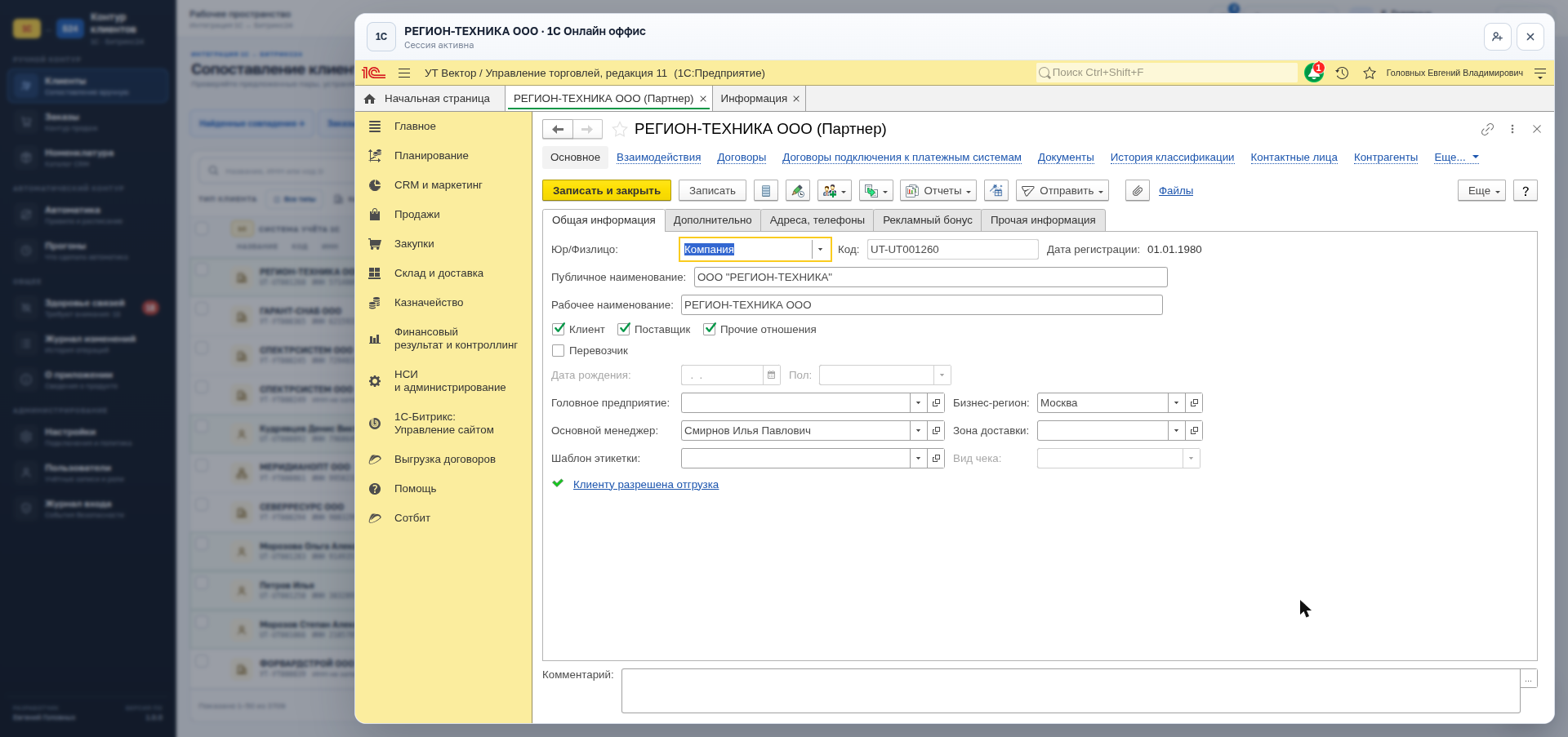
Any 1C record opens straight from its row, without a separate 1C sign-in
- “Online” and “Desktop” buttons on every partner, order and document
- “Online” opens the built-in 1C web client as a panel on top of the app
- “Desktop” opens the installed 1C client via an e1c:// link
- Sign-in as an infobase user; the password is kept only in the session
- The web client is proxied through the app, so the 1C session persists across records
- On the production base the proxy automatically detects the 1C publication name and corrects the paths
- The same module can be embedded as a tab in a Bitrix24 company card
Orders7
The whole 1C sales history in one list, linked to clients
- Orders, sales, returns and adjustments from the live 1C
- An archive from the old 1C base: Excel exports imported with a check before writing
- Summary: total documents, clients with orders, ready to export, no Bitrix24 link, transferred
- Search by number, client, entity, tax ID and organisation; filters by type, link, period, shipment
- For each document: its partner, amount, shipment percentage and export readiness
- Client history: every document of one company
- Empty amounts and missing shipments are never replaced with zero
Export to Bitrix246
Past orders move into the CRM, and financial data in both systems match
- Three ways to select: by company, by ticked rows, by the current filters
- Orders become deals; sales, returns and adjustments become entries on the company card
- A plan first: recipient, action and blocking reason per row, with nothing written to the CRM
- Duplicate protection: a receipt before writing and a lookup of already exported documents
- Progress, a CSV report, retry on failure and stop; closing the window doesn’t interrupt the export
- Before running, the document and the link are rechecked: if anything changed, a new plan is needed
Products5
1C products → the CRM catalog, linked by GUID
- Loading from 1C by selected warehouses and product groups
- Warehouse and group trees with search, “All”, “None”, “Visible”
- Export to the Bitrix24 catalog with XML_ID set to the 1C GUID
- Updating order product rows once the catalog is exported
- A per-load item limit and a job queue
Link integrity6
Links are checked continuously, so problems are detected before they disrupt the exchange
- Nine integrity checks over snapshots of both systems
- A link to a partner missing from 1C; a vanished legal entity; a diverged tax ID; a company deleted in the CRM
- Severity: critical and to-reconcile, critical first
- Each problem says what happened and what to do
- Repair of selected rows in one action and “Recheck links”
- A problem counter in the menu
Change log5
Every action is logged, and confirmations can be rolled back
- Link confirmations, link repairs, exclusions, company deletions
- Time, action, 1C and Bitrix24 entities, actor and status
- Safe rollback of a confirmation; deletion is marked as irreversible
- Filters: done, cancelled, errors
- Jump to the Bitrix24 company from any entry
Snapshots and background jobs5
1C and Bitrix24 are read into snapshots, so production systems aren’t loaded
- A full 1C and Bitrix24 load in stages: connections, 1C, Bitrix24, snapshot check
- A real percentage, the current stage and a count of rows read
- 1C is read over OData by a read-only technical user
- Match probabilities are recalculated after the snapshots refresh
- Jobs keep running in the background; the browser moves to the result automatically
Connections and write policy5
What to carry over from 1C and which Bitrix24 data must not be changed
- 1C OData, Bitrix24 REST and PostgreSQL connections with checks and status
- What to carry over on confirmation: phones, email, tax IDs, city
- If a Bitrix24 field is filled: keep it or replace it with 1C data
- A “Create integration fields” button prepares the fields and list in Bitrix24
- Passwords and webhooks are never shown in the interface once saved
Automation and rules5
What runs automatically and what is done manually
- Rules by section: data intake, linking, companies, orders, products
- A mode per rule, a schedule and limits
- A master switch: settings are kept while automation is off
- Matching rules: signal weights, thresholds, blocking conflicts, normalisation
- “Runs” show what the automation did and when
Backups5
Restoring the app after a server loss
- Twice a day: database, settings and code in one archive
- AES-256 encryption with a password kept separately
- The copy arrives by email and is stored on the server with a download link
- A configurable number of copies to keep; extra ones are deleted automatically
- Restore from the interface and “Back up now”
Users and security5
Access rights and sign-in history
- Accounts and roles with per-section permissions
- Two-factor sign-in via an authenticator app
- Password reset by email
- A sign-in and security event log
- A notification centre: in-app alerts, emails about urgent events, recipients per event
Tuned to the company’s processes
Write policy
What to carry from 1C into Bitrix24 and whether filled fields may be overwritten.
Matching rules
Signal weights, decision thresholds, blocking conflicts and value normalisation.
Automation
Which jobs run automatically, on what schedule and with which limits.
Catalog
Which 1C warehouses and product groups make it into the CRM catalog.
1C and Bitrix24 order exchange
After linking, orders are transferred between the systems according to the client’s business process: an order created in Bitrix24 appears in 1C and vice versa, and data in both systems stays up to date.
Reliability
Read-only 1C
A dedicated technical user with minimal rights: the app cannot alter the accounting data.
Log with rollback
Every confirmation and deletion is logged, and confirmations can be safely rolled back.
Backups
Twice a day the database, settings and code go into an encrypted archive, restored from the interface.
Access and alerts
Roles and permissions, two-factor sign-in, a security log, in-app alerts and emails about important events.
A few more screens
Not a standard exchange but an integration that resolves duplicates, links clients by GUID and reconciles financial data in 1C and the CRM. I’ll set up a similar solution for your company’s processes.
Evgeniy Golovnikh
Stack
Backend
- Python 3.11
- FastAPI
- Jinja2
- PostgreSQL
- psycopg 3
Integrations
- 1С OData
- План обмена 1С
- 1С Онлайн офис
- Bitrix24 REST
- Универсальные списки Б24
Quality & reliability
- unittest
- pg_dump
- OpenSSL AES-256
- TOTP 2FA
- SMTP
A similar task?