A payments module inside Bitrix24, from request to the last transfer

- 563
- commits
- 17
- expense categories
- 120
- category-to-item links
- 0
- manual balance calculations
Payment Plan is a module for payment tracking in Bitrix24: the payment request, payment approval in Bitrix24, and partial and foreign-currency payments are handled in one smart process card. Analytics shows the load by day and month, the next 14 days and overdue payments.
The problem
Payments were tracked in email, spreadsheets and chats
Payment requests arrived by email and chat, and invoices got lost in attachments. To see what was paid, what was left and which deadlines were approaching, finance had to cross-check several sources and recalculate partial and foreign-currency payments manually.
Management needed a separate Excel summary to see the expense structure, and it was out of date by the time it was ready.
The solution
The whole payment in one Bitrix24 card
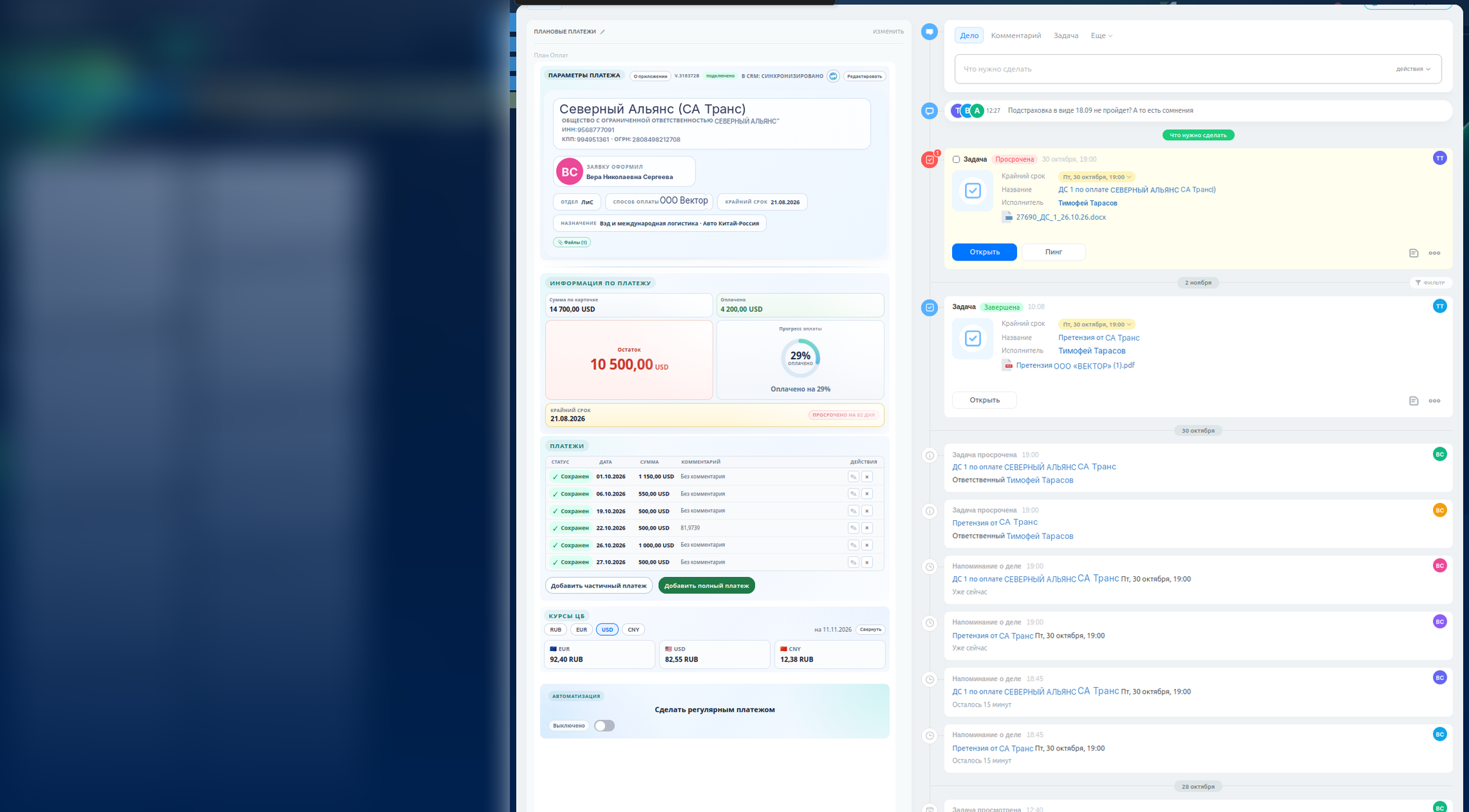
The module is embedded in the “Planned payments” smart process card. Employees keep working in the familiar CRM, and the card automatically calculates everything that used to be calculated manually.
- Payee with company details, who raised the request, department, payment method and deadline
- The balance in large type, a progress ring and an “Overdue by N days” badge
- A table of partial payments with dates and comments
- Today’s central bank rates and conversion between roubles, dollars, euros and yuan
- A “Make this a recurring payment” switch
The request
A payment request in a minute
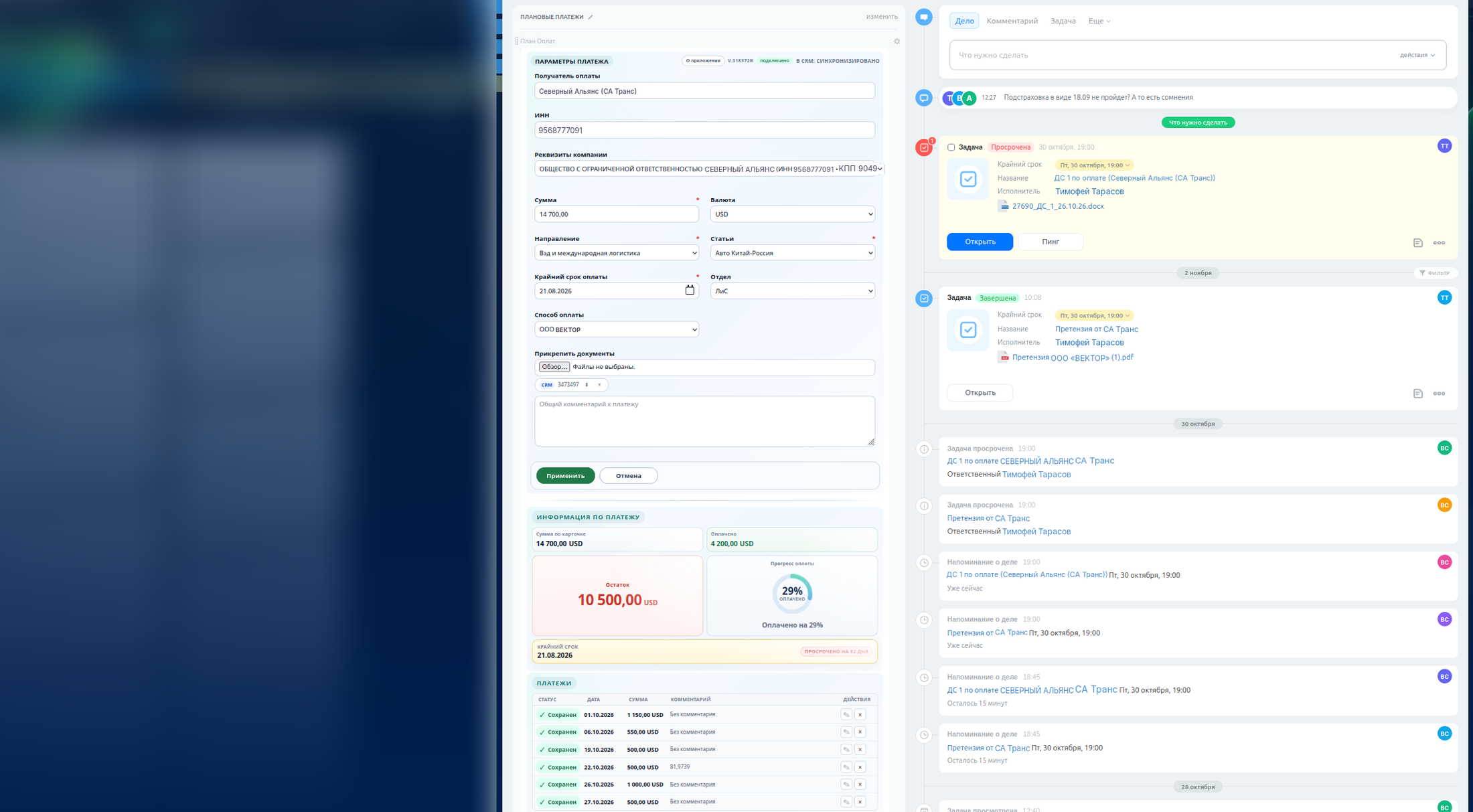
The payee is selected by searching CRM companies, and the full legal name and tax IDs are filled in automatically. The user then specifies the amount, currency, department, paying legal entity and deadline, and attaches invoices and contracts.
- The expense item list only shows items for the chosen category, so freight can’t end up under rent
- The card can’t be saved without a category and an item
- Documents can be attached before the card is created and are retained
Payment lifecycle
1. Request
An employee creates a card in “New”. The amount, deadline and documents are immediately visible to finance.
2. Approval
Finance approves the request and puts it into the payment plan. Each kanban column shows its total.
3. Bank and currency
Separate stages for the bank, foreign-currency payments and loans, showing the current stage of each payment.
4. Paying in parts
Accounting adds a partial or full payment. Balance, percentage and overdue status update immediately, and an entry is added to the card’s feed.
5. Closing
When the balance reaches zero, the payment is closed and the totals appear in analytics immediately.
Recurring payments
Rent, telecoms and subscriptions are marked once. A background job creates the next cards every morning and refreshes deadline statuses.
Analytics without Excel
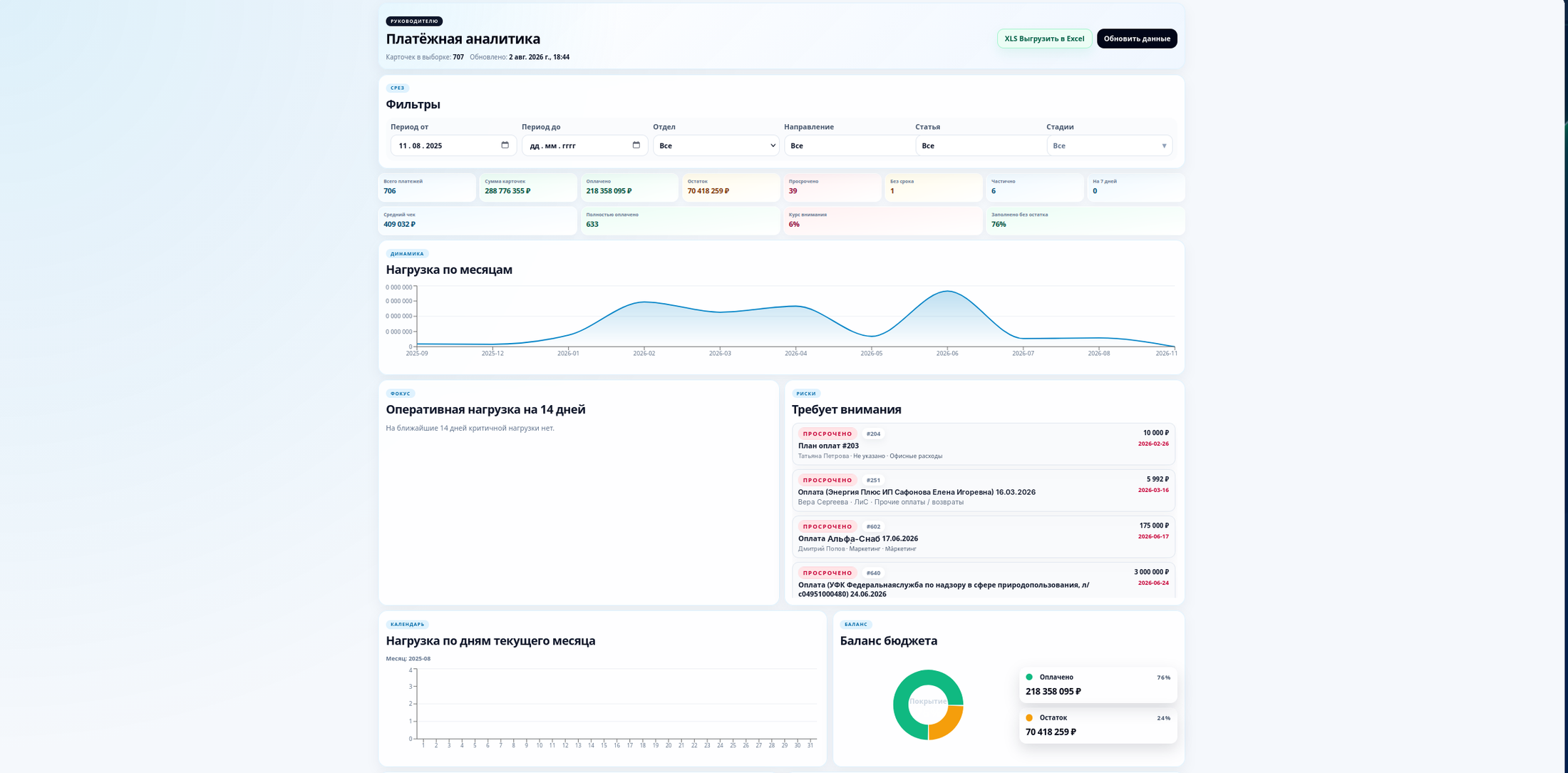
Totals at a glance
How many payments, the total amount, how much is paid, the balance, how many are overdue and the average size.
What needs attention
Overdue payments with the amount and owner; a click opens the card in the CRM. Next to it, the load for the next 14 days.
Expense breakdown
Breakdowns by owner, payee, department, category, expense item and stage, with charts.
Trends and balance
Load by month and by day, and the paid vs remaining share of the budget.
Filters and Excel
Period, department, category, item and stage. The Excel export puts the summary, risks and breakdowns on separate sheets.
Access
Only accounting can change payments
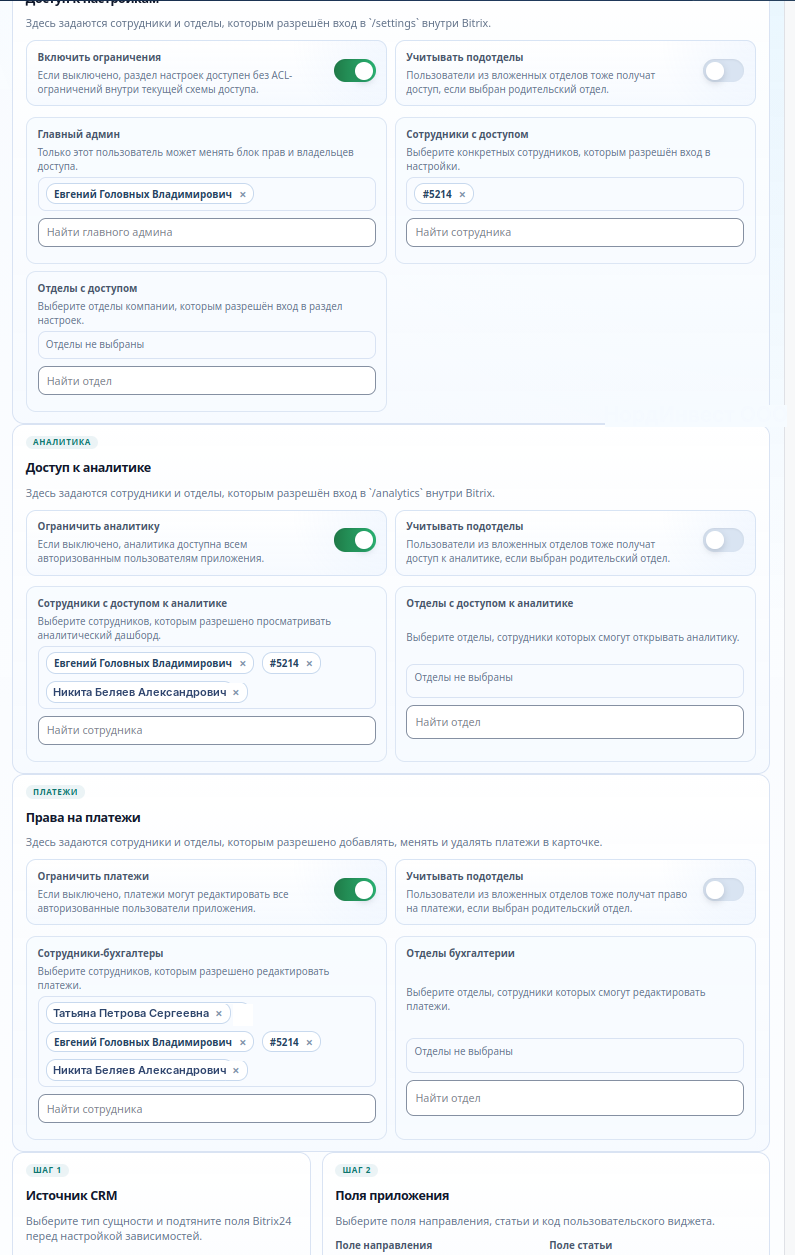
Permissions are set separately for three areas: changing settings, viewing analytics, and adding, editing and deleting payments. Access is granted to specific employees or entire departments, optionally including sub-departments.
- Restrictions are enforced on the server, not only in the interface
- A single main administrator manages permissions
Setup
Set up without a developer
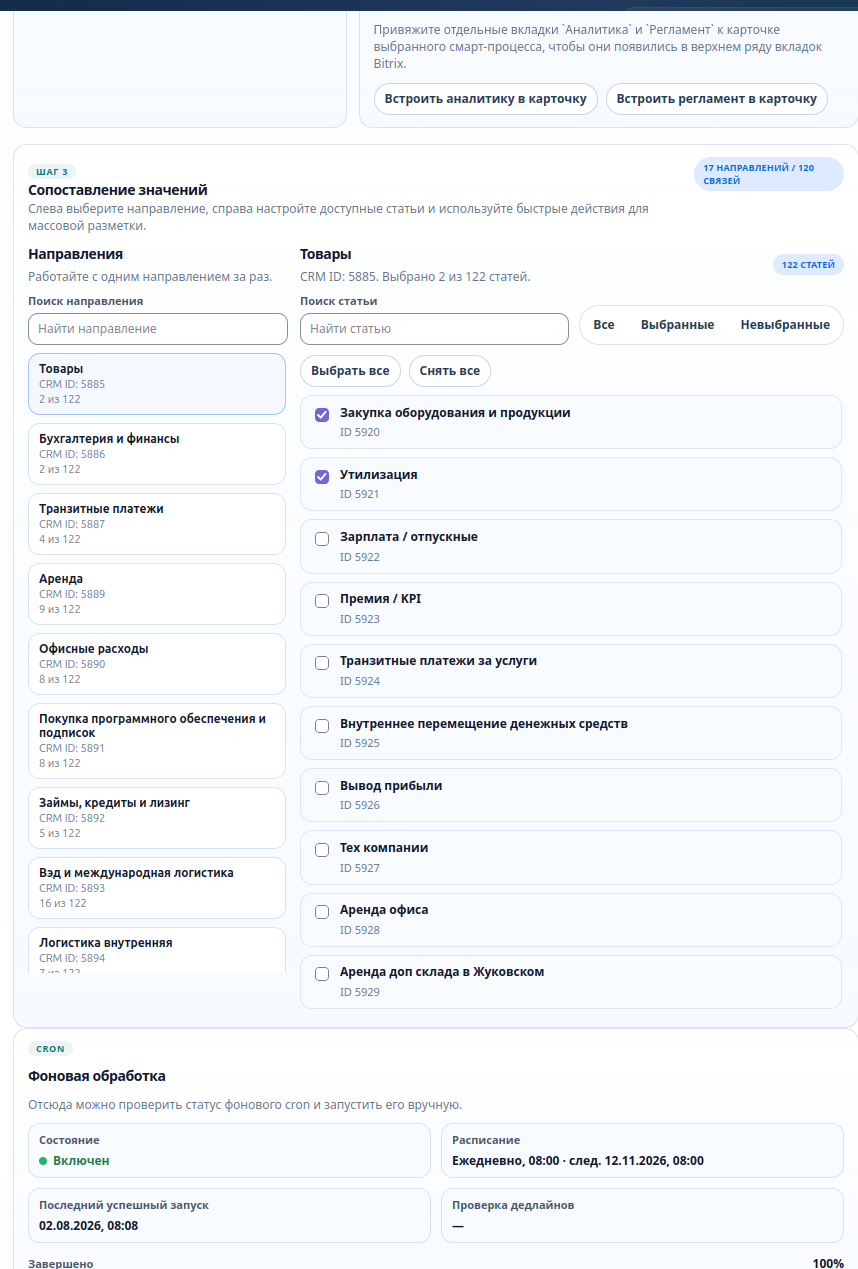
The category-to-item reference is edited in a wizard: category selection, item checkboxes, search and select-all. The same section holds the CRM source, app fields, background job schedule and a manual run button.
Benefits
One place
Request, documents, approval, payments and discussion in one card instead of email and spreadsheets.
Automatic calculations
Balance, percentage, overdue status and currency conversion update the moment a payment is entered.
Fewer mistakes
An item can’t contradict its category, company details come from the CRM, and an empty request can’t be saved.
Deadline and history tracking
Recurring payments are created automatically, overdue items are shown on the card and the dashboard, and the full history is kept in the feed.
Works as part of the CRM
Amounts, balance and status are written to regular Bitrix24 fields, so filters, reports, robots and workflows all keep working.
Access control
Only accounting can change payments, and only authorized users can view analytics.
Technical implementation
A custom Bitrix24 field type
The app registers its own user field type, and Bitrix24 renders the widget right inside the smart process card.
Data in CRM fields
Payments and templates live in PostgreSQL, and totals sync back to the card fields, with a resync button in the widget header.
The card feed
Adding and deleting payments is written to the Bitrix24 timeline on behalf of the employee.
Background job
Every morning it creates recurring payments and refreshes deadline statuses, with status and a manual run in the settings.
Screens
Finance no longer collects payments from email and spreadsheets: all data is kept in Bitrix24, and balances and overdue items are calculated automatically. I can build a similar module tailored to your processes.
Evgeniy Golovnikh
Stack
Frontend
- React 19
- Vite
- Recharts
- Chart.js
- Tailwind CSS
Backend
- Node.js
- PostgreSQL
- cron
Integrations
- Bitrix24 REST
- userfieldtype
- Курсы ЦБ РФ
A similar task?