Shows every day who sells below the recommended price — with the seller’s tax ID and history

- 11
- marketplaces and partner stores in one search
- 133
- items on the MAP watch list
- 392
- seller offers analysed in a single check
- 190
- automated tests verify price parsing
MAP price monitoring across 11 marketplaces and partner stores: every day the app checks 133 items, compares each seller's offer with the recommended price and keeps the history. MAP violation tracking shows the seller's tax ID, the deviation and how the price has changed since the last check.
The problem
Who sells below MAP — and for how long
A manufacturer sets a recommended retail price, and sellers on marketplaces and partner stores sell below it. Checking a hundred items across a dozen platforms manually is impossible: each product has several sellers, prices change daily.
They needed to know every day who violated MAP, by how much, on which platform and since when — with the seller’s legal details, to support a claim to the seller or the marketplace.
The solution
Every seller of every item in one table
The parser searches by your item list, not by category: on each platform it collects every seller’s offer and checks the price against MAP right away.
- Price, MAP, deviation as a percentage and an “OK” or “violation” status
- The seller with its tax ID, pulled from the store page
- A market summary: average, median and lowest price, and how many sellers fall in each band
- Price movement since the last check
How MAP price monitoring works
1. Item list
Brand, model and MAP. Paste rows in bulk or upload CSV/XLSX.
2. Search across platforms
A browser in the container searches each item on the chosen platforms and collects every seller’s offer. Products already found are later reread by their direct link.
3. MAP check
Each offer gets a deviation and a status: within 5%, 5–15% below, or more than 15% below.
4. History and reports
Every check goes into the database, which feeds analytics, a monthly Excel file, Google Sheets and a file in Telegram.
Sections and capabilities
Four chapters: search, sellers, analytics and server. Scroll down and the camera moves across the main screens, stopping at what matters most.
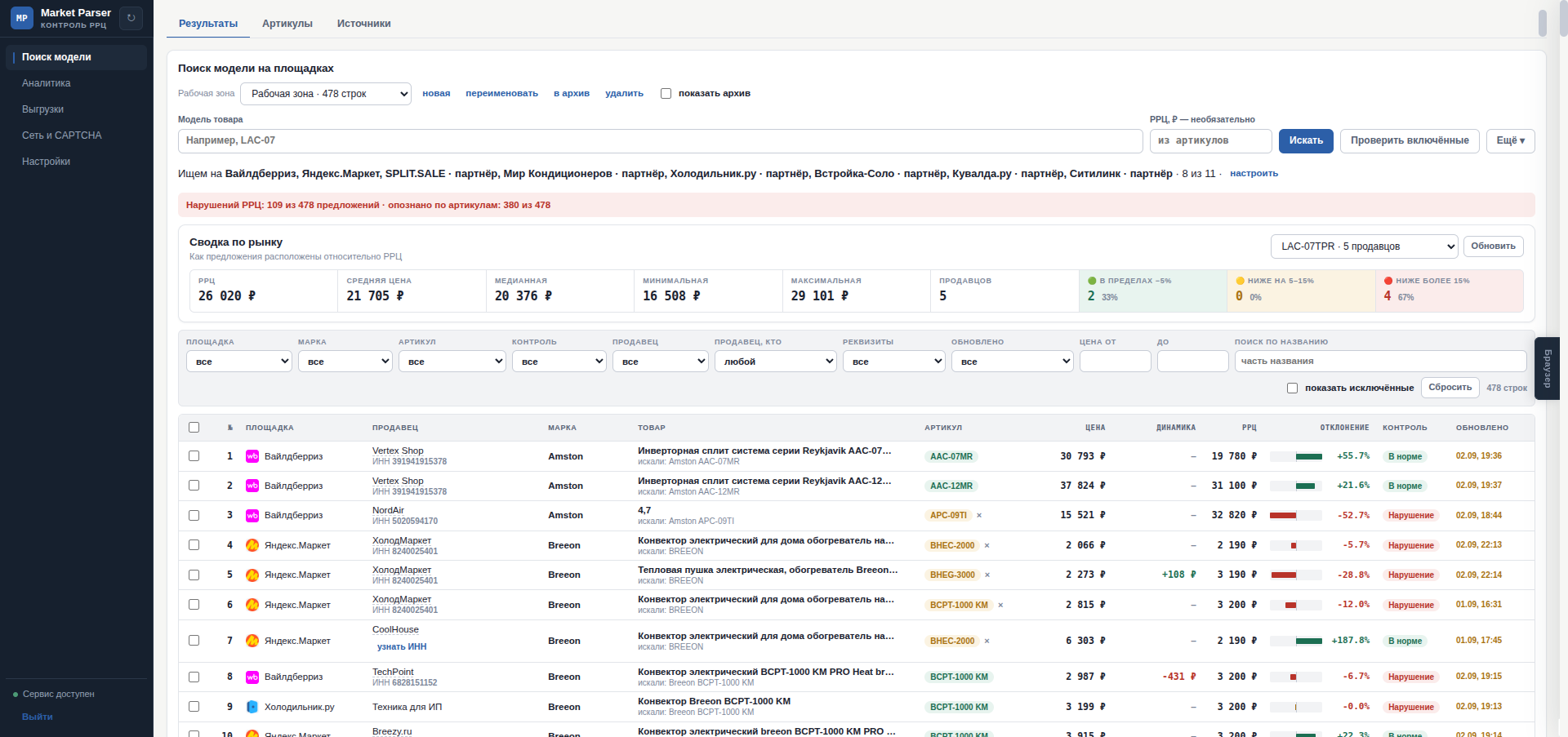
Results
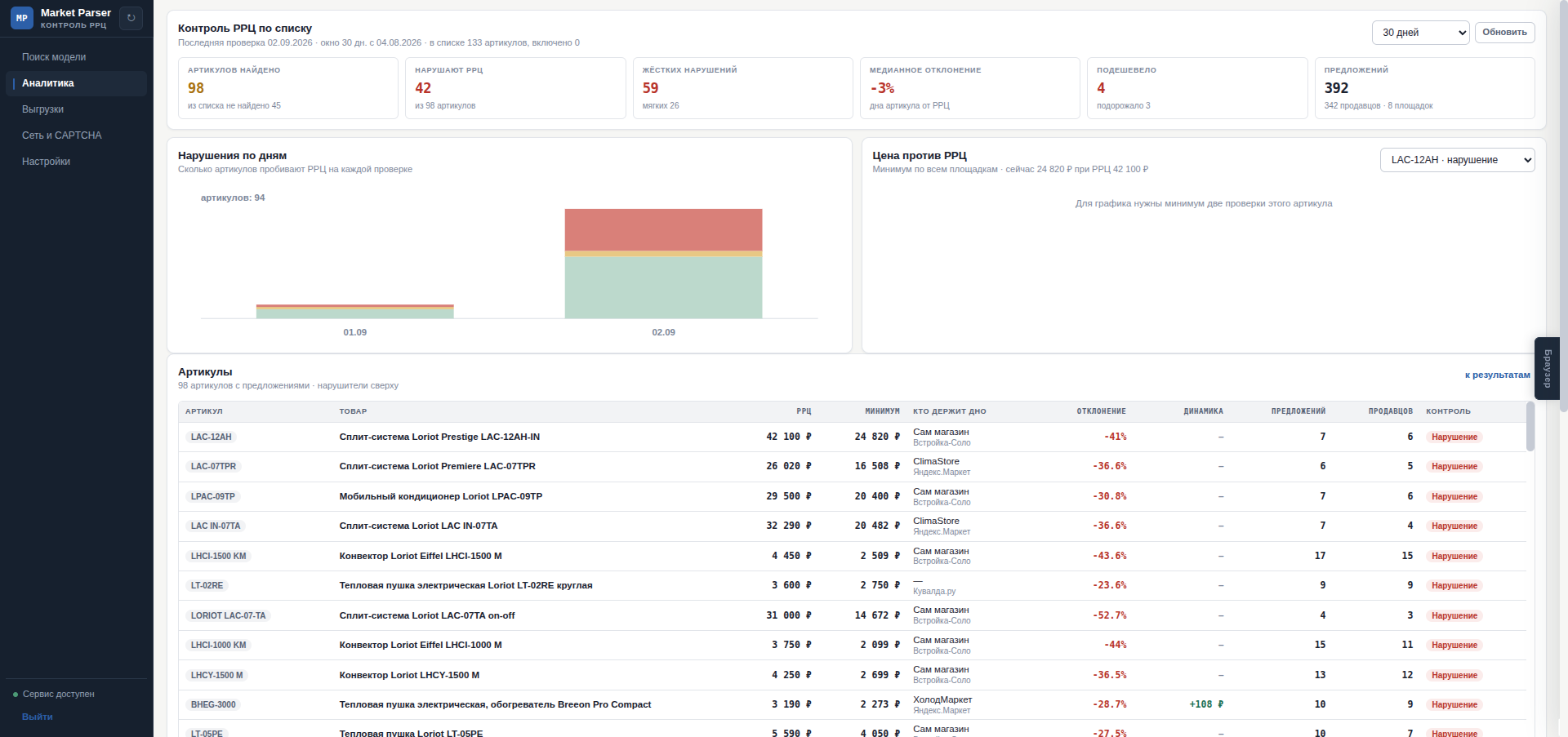
Analytics
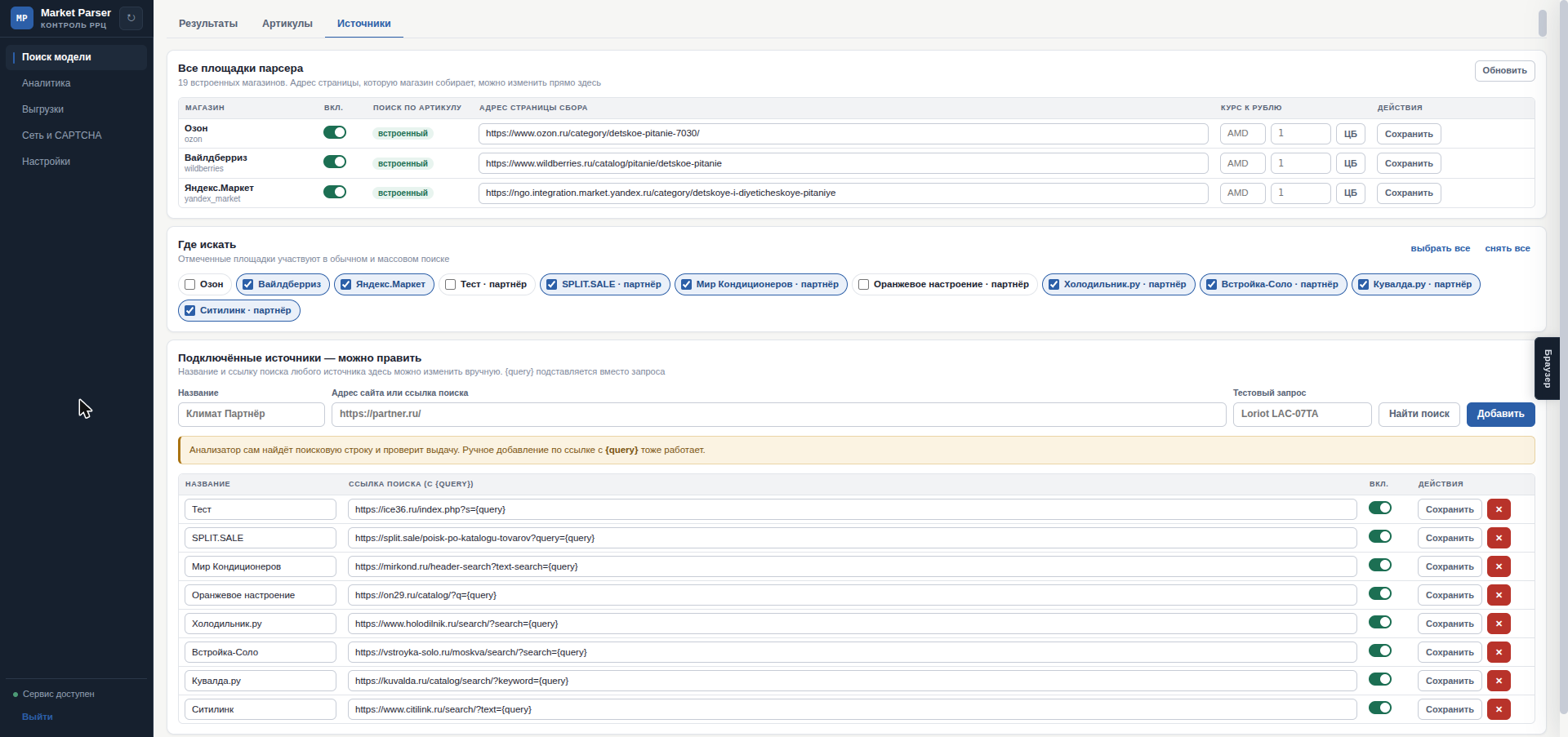
Sources
Every section of the app
Results8
Every offer for an item on every platform, and who breaks MAP
- A one-off model search with MAP, or the whole list checked in one job
- Platform, seller with tax ID, brand, product, item, price, MAP, deviation, status
- A market summary: MAP, average, median, lowest and highest price, number of sellers
- Bands: within 5%, 5–15% below, more than 15% below
- Filters by platform, brand, item, status, seller, legal details, date and price
- Price movement since the last check
- Workspaces: separate result sets with an archive
- The seller’s tax ID is pulled from the store page; if missing, a “find tax ID” button
Manual matching5
Doubtful offers are reviewed manually, without automatic assumptions
- An offer the parser couldn’t identify can be linked to an item manually
- MAP can be assigned right from the results table, for one row or a group
- “Rematch” reruns the results against the updated item list
- Excluded rows are hidden, not deleted — a checkbox shows them again
- Export of the filtered rows to Excel
Recheck by links5
A found product is reread by its direct link, without a new search
- “Refresh all by links” opens product pages that are already known
- It’s many times faster than searching and puts far less load on the platform
- The price is read in layers: JSON-LD, then microdata, then Open Graph
- A page with no price is flagged as a problem rather than filled with an assumed value
- The table can be rebuilt from the saved links after a failure
Workspaces4
A new search never overwrites previous results
- Several result sets side by side, one active
- Create, rename, archive, delete — only on an explicit command
- Each workspace keeps its own filters and rows
- Archived workspaces can be shown and brought back
Items6
What’s monitored, and the check schedule
- Brand, model and MAP for each item, with an “enabled” flag
- Bulk paste of “Item; MAP; enabled” rows and CSV/XLSX import
- Where the item was found and how many links were collected
- Check a single item on demand, with progress
- A scheduled check: time and weekdays, platforms as on the “Sources” tab
- “Enable all” and “Disable all”
Sources6
Where to look: marketplaces and any partner store
- Built-in platforms: Ozon, Wildberries, Yandex Market
- A partner store is added by its search URL with {query}
- The analyser automatically finds the site’s search box and checks the results
- Products and prices are extracted from JSON-LD or result cards
- Platforms for search picked from one row of toggles
- Prices in another currency are converted at the central bank rate
Seller directory6
Seller details for every offer
- A seller is remembered by its platform ID: a name seen once fills every row of that seller
- Tax ID, registration number and legal address are read from the seller page
- Foreign sellers without a tax ID are recognised by their registration number
- A link to the seller card straight from the table
- “Seller type” and “Legal details” filters: company or sole trader, details found or not
- Missing details are collected in the background
Analytics6
Trends over time: who lowered the price and whether violations are increasing
- Window totals: items found, MAP violators, hard and soft violations, median deviation
- Violations by day: hard (deeper than 15%) and soft (5–15%)
- Price vs MAP: the lowest price across platforms charted against the MAP line
- For each item — the seller with the lowest price, the deviation and the price trend
- Platforms and sellers by median deviation and largest deviation below MAP
- An item with no offers is counted separately: it indicates a monitoring gap, not an absence of violations
Exports and delivery5
Reports are delivered automatically, without opening the panel
- A monthly XLSX: regular, discounted and loyalty-card price for each date
- Google Sheets: a 30-day showcase refreshes after each check
- A Telegram bot sends the file every morning and answers commands
- Manual file sending and sync for a chosen period
- The full price archive is stored in SQLite
Platforms and currency rates5
Each platform is set up separately, and prices are converted to roubles
- A custom collection URL for each built-in platform
- Turning a platform on and off without losing its settings
- Page selector probing: what the parser sees on a product page
- The rouble rate set manually or from the central bank for today
- Platform icons are fetched automatically
Network5
Which address the parser uses to reach the platforms
- Corporate WireGuard: the config is pasted in the panel and stored with 600 permissions
- Connect, disconnect, check the external IP
- The tunnel starts together with the server
- A browser proxy with username and password
- A warning if a full tunnel would disconnect the panel from the local network
Settings and server5
Everything is set from the panel, without editing files
- Telegram bot, Google Sheets, proxy — in a protected .env
- Secrets are never shown again: an empty field keeps the current value
- How many stores to check at once, sized to the container’s memory
- Username and password sign-in with a 30-day session
- Runs in a Proxmox container as a systemd service, with collection on a timer
Advantages
Violators at a glance
Red rows, deviation as a percentage and the seller with the lowest price for each item.
Grounds for a claim
The seller’s tax ID, a product link and price history — a ready basis for a claim to the seller or the marketplace.
Adding a store in a minute
A partner site is added by its search URL. The analyser automatically finds the search box and checks the results.
Scheduled automatic operation
A scheduled check by weekday, a file in Telegram every morning and automatic Google Sheets updates.
A hundred items, a dozen platforms, daily checks — and only sellers who violate MAP on screen. I’ll set up similar monitoring for your product range.
Evgeniy Golovnikh
Stack
Backend
- Python 3.11
- FastAPI
- SQLite
- httpx
- BeautifulSoup
Scraping
Integrations
- Google Sheets API
- Telegram Bot API
- XLSX
- Курсы ЦБ РФ
Infrastructure & quality
- Proxmox LXC
- systemd
- WireGuard
- pytest
A similar task?