Checks client websites from Bitrix24 and enriches the cards: phones, emails, cities, regions, social networks

- 8 463
- client websites from Bitrix24 checked for availability and contacts
- 14
- messengers and social networks recognised on site pages
- 10.8K
- CRM cards checked against the city and region directory
- 0
- rep-filled fields overwritten automatically
The problem
Thousands of CRM companies with stale contacts
Bitrix24 holds more than ten thousand companies, and many cards have just a name and a website. No city, no region, a five-year-old phone number. Meanwhile the websites change: they move to other domains, go offline and update their numbers. Calling without current data is costly, and checking every site manually takes weeks.
The task was to check client websites automatically, identify the available ones, extract contacts and location data and suggest filling in the cards — without altering what reps had already entered manually.
The solution
The client’s website as a CRM data source
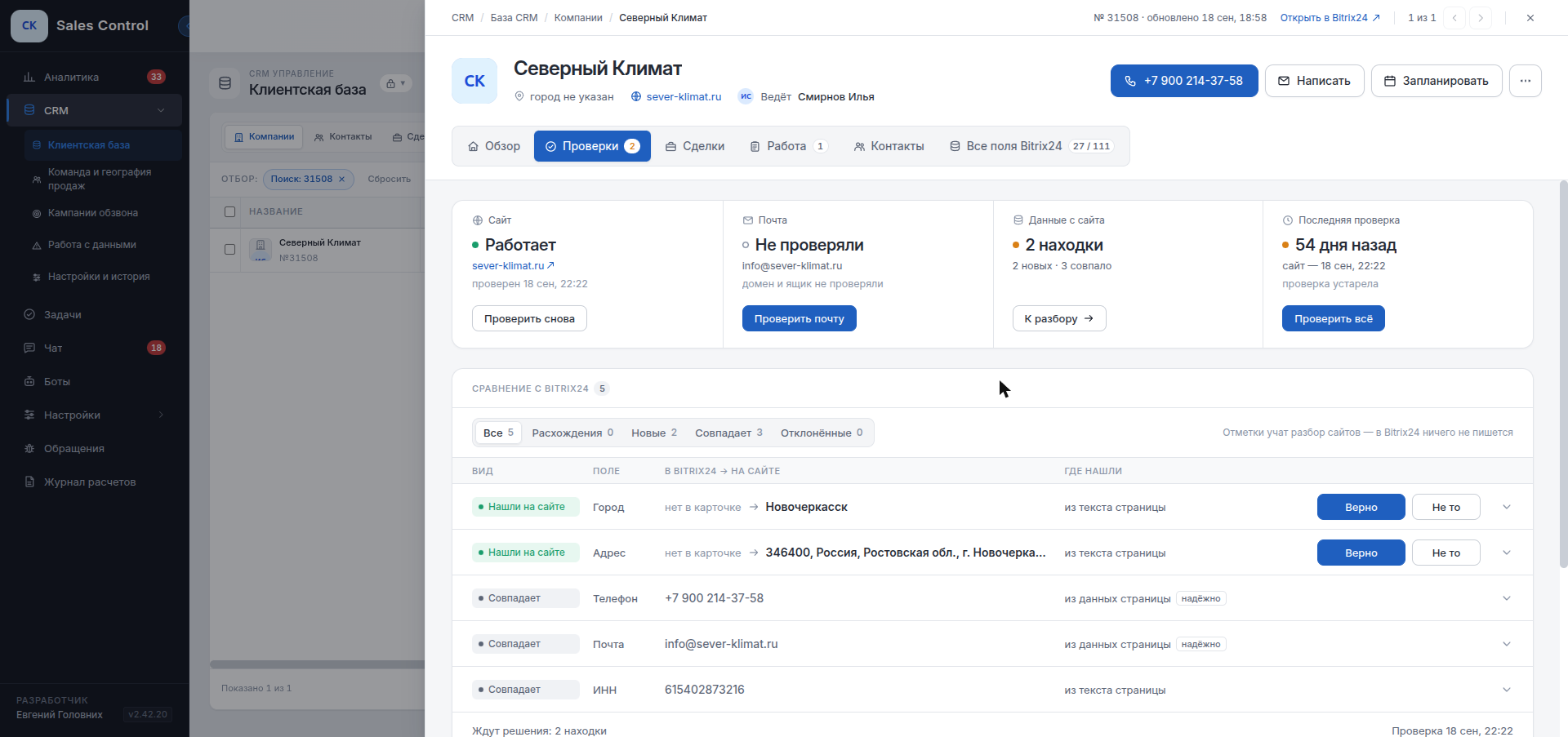
The module works together with Bitrix24: it takes the websites from company cards, checks them and shows what was found and how it differs from the CRM. A user decides on each finding.
- Site availability: working, unreachable, a hosting placeholder, or access blocked
- Phones, emails, city, address, tax ID and logo from the contacts page
- Messengers and social networks: Telegram, WhatsApp, VK, YouTube, Dzen and more
- Comparison with the card: “found on site”, “matches”, “differs”
How the website contact scraper works
1. Websites from the CRM
The module takes websites from Bitrix24 company cards — all of them or only those missing a city and address.
2. Availability check
The home page opens and the contacts page is found. Registrar and hosting placeholders are recognised by their traits, not by a list.
3. Contact parsing
First the data the site publishes about itself (search engine markup), then “call” and “write” links, and only then the page text.
4. User confirmation
A finding stays a suggestion with its source. City and address go to Bitrix24 — with a preview, a log and rollback.
Sections and capabilities
Three chapters: site checks, data enrichment and the Bitrix24 link. Scroll down and the camera moves across the main screens.
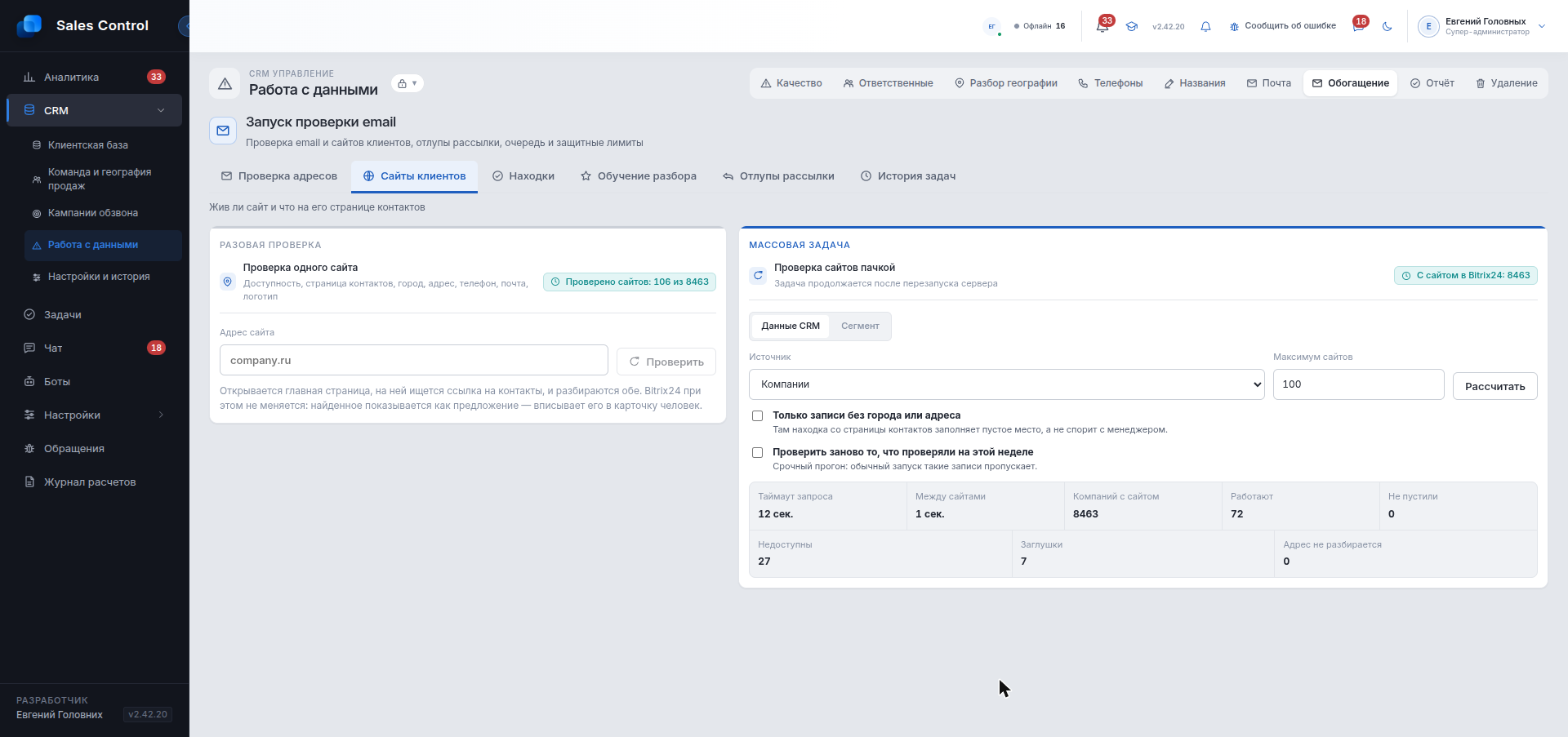
Bulk and manual checks
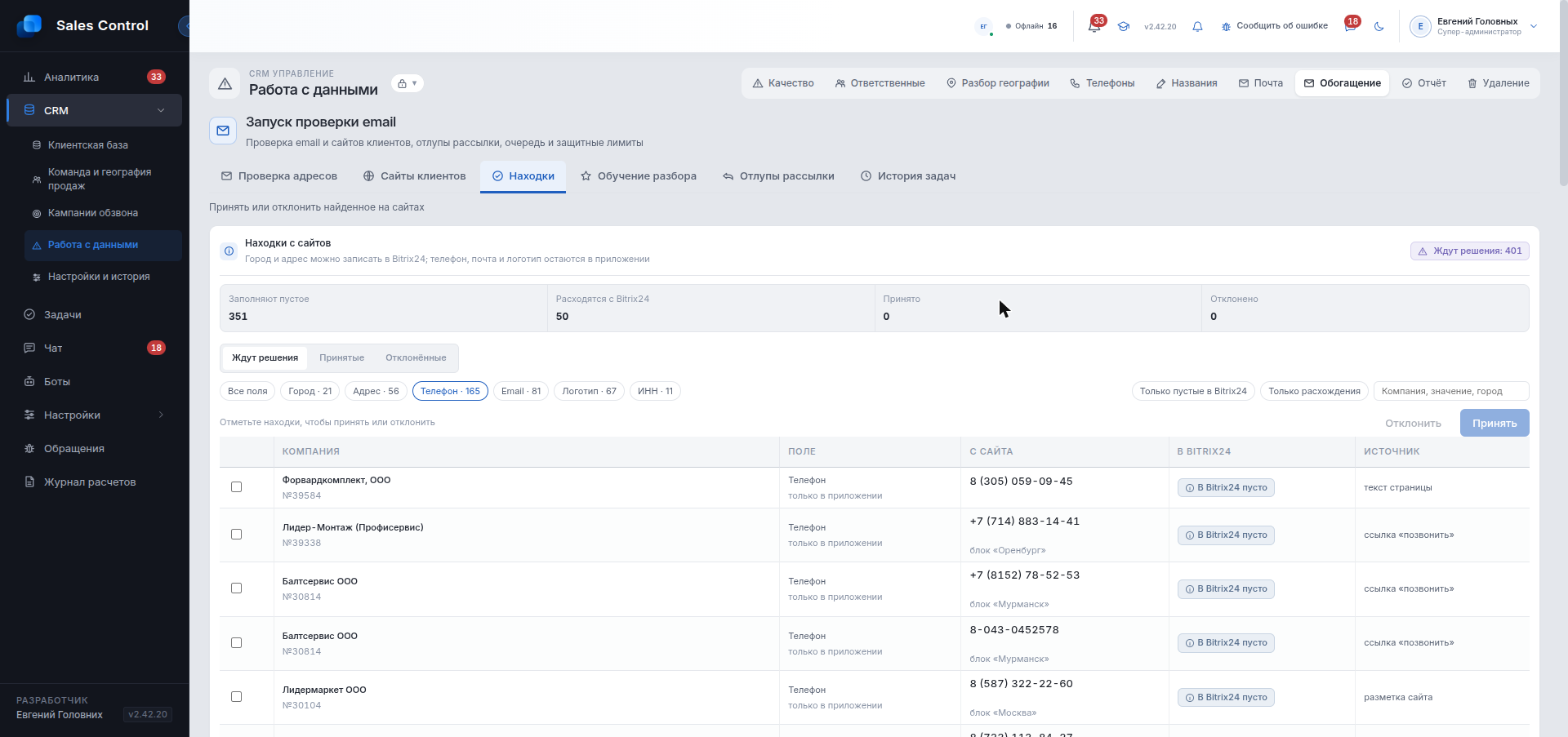
Contacts from the site
CRM writes with rollback
Every section of the app
Bulk and manual checks7
One site on demand, or the whole base in one job
- A one-off check: enter a site address to get the result; Bitrix24 is not modified
- A bulk job over CRM companies or a segment
- A “records without a city or address only” filter — fill only empty fields without changing a rep’s data
- An out-of-schedule run: recheck sites already checked this week
- The queue survives a server restart and carries on where it stopped
- Pauses between sites and distribution of requests by host: a site shared by ten entities doesn’t get ten requests in a row
- A run summary: working, unreachable, placeholders, access blocked, unrecognised address
Site availability5
An unavailable site is a signal to update the client’s data, not an error
- The site status on the company card: working, unreachable, placeholder, access blocked
- Registrar and hosting placeholders are recognised by their traits, not a brand list
- The same page on a dozen domains means a provider — such a site isn’t counted as the client’s
- Domain changes: a redirect to a third-party domain is shown in the results
- The last check date and a “check is stale” marker
Contacts from the site6
Phones, emails, messengers and social networks from the contacts page
- Phones and emails with their source: site markup, a “call” link or the page text
- Messengers: Telegram, WhatsApp, MAX, Viber, VK, Skype
- Social networks: VK, Odnoklassniki, YouTube, Rutube, Dzen, Telegram channels and more
- The company’s tax ID and logo
- A contact found on many sites is excluded as third-party: a web studio, host or dealer
- Phones and emails stay in the app: multi-value Bitrix24 fields are never overwritten
Cities, addresses and regions5
Where the client is — from the site and the directory
- City and address from the contacts page, including branch blocks
- With several offices, the contacts of the one in the client’s city are taken
- A city directory: old names, Latin look-alike letters and typos are normalised
- The region is set in a separate Bitrix24 field from the directory city
- Confident spellings are applied in one action, doubtful ones by picking a city
Parsing lessons4
User marks define what not to treat as a client contact
- Non-client sites: registrar, hosting and site-builder domains
- Rules: which phone or email never to suggest again
- A rejected finding doesn’t come back on the next run
- The browser identification (User-Agent) changes if sites start blocking access
Findings and decisions5
Every finding is a row with a status, not a line in a report
- Awaiting a decision, accepted, rejected — on separate tabs
- How many findings fill a blank and how many differ from Bitrix24
- Filters by field: city, address, phone, email, logo, tax ID
- Bulk “accept” and “reject” for ticked rows
- Search by company, value and city
CRM writes with rollback5
Only data verified by a user goes to Bitrix24
- A field-by-field comparison with the card: “found on site”, “matches”, “differs”
- “Correct” and “Not it” buttons right on the company card
- City and address are written through the bulk edit queue with a preview and confirmation
- Every write is logged and can be rolled back in one action
- A read-only mode for the portal: data is analysed, but nothing is written
Advantages
Automatic database enrichment
Thousands of cards get a city, address, region and current contacts without manual searching.
Unavailable sites detected immediately
A company’s unavailable website indicates a stale contact, and the card shows it.
Third-party contacts excluded from the CRM
A web studio’s, host’s or dealer’s phone is excluded: a number found on a dozen sites does not belong to any one client.
Safe writes to the CRM
Fields a rep filled in are never overwritten, and every Bitrix24 write can be rolled back in one action.
More screens
Ten thousand companies, each now showing site availability, location and current contacts. I’ll set up similar data enrichment for your CRM.
Evgeniy Golovnikh
Stack
Backend
- Node.js
- TypeScript
- SQLite
Site parsing
Integrations
- Bitrix24 REST
- Справочник городов и регионов
UI & quality
- React 19
- Vitest
A similar task?