A company’s entire infrastructure and security in one window

- 1,081
- commits in six months
- 245K
- lines of TypeScript
- 15
- integrations
- 24K
- lines of Go in the agents
INNOD is an IT operations platform that brings Zabbix, Proxmox, MikroTik, the WAF, mail and Bitrix24 into a single panel. It provides server attack protection with automatic blocking based on 25 signals, remote employee support through an agent on each computer, IT asset management with stocktaking from a phone, and Proxmox backup checks.
Project scale
- 34
- interface modules
- 171
- tables in SQLite
- ~50
- remote commands for computers
- 25
- signals in the threat engine
Before INNOD and after
A dozen scattered consoles
Zabbix, Proxmox, MikroTik, the WAF, mail and Bitrix24 operated separately. Their status is now shown on one screen and managed from a single panel.
Attacks were detected in logs after the fact
The engine scores every address on 25 signals and automatically blocks it on the WAF, the router, fail2ban and the mail server. Administrators see the rationale behind each decision.
Support required on-site visits
An agent on each computer provides remote desktop, terminal, files, chat and about 50 commands, from disk cleanup to installing updates.
Hardware tracked in a spreadsheet
Warehouse, QR labels, handover forms, warranties and reconciliation. Stocktaking is done from a phone in Telegram.
Access provisioning took several days
An AD account, mailbox, VPN and Bitrix24 department are created in a single operation. The password is delivered via a one-time protected link.
Backups were not verified
Proxmox Backup Server coverage and freshness, integrity checks and a restore-readiness score for every service.
IT operations platform capabilities
Six groups of sections in the same order as the INNOD menu. Select a section to view its capabilities.
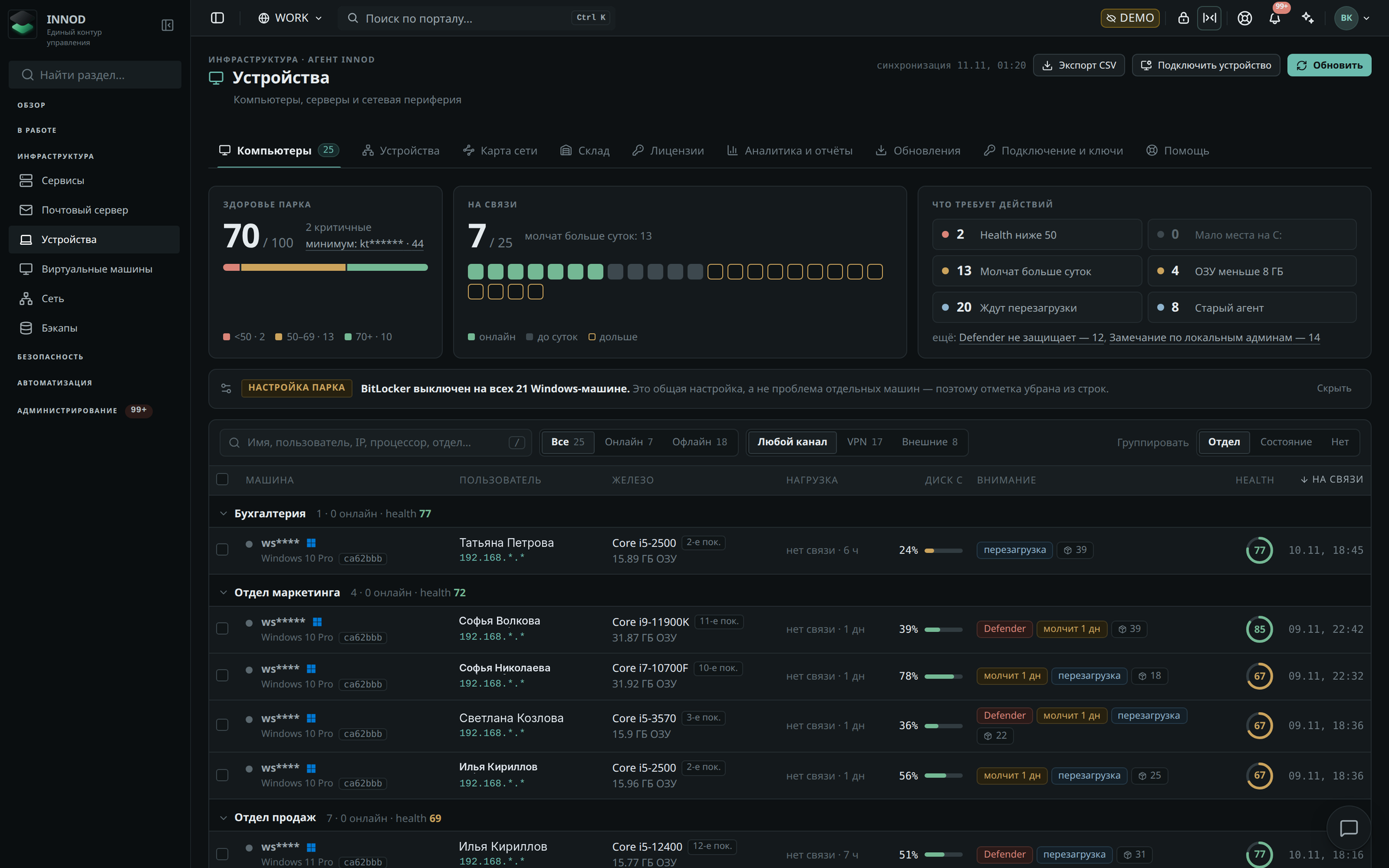
Computer fleet
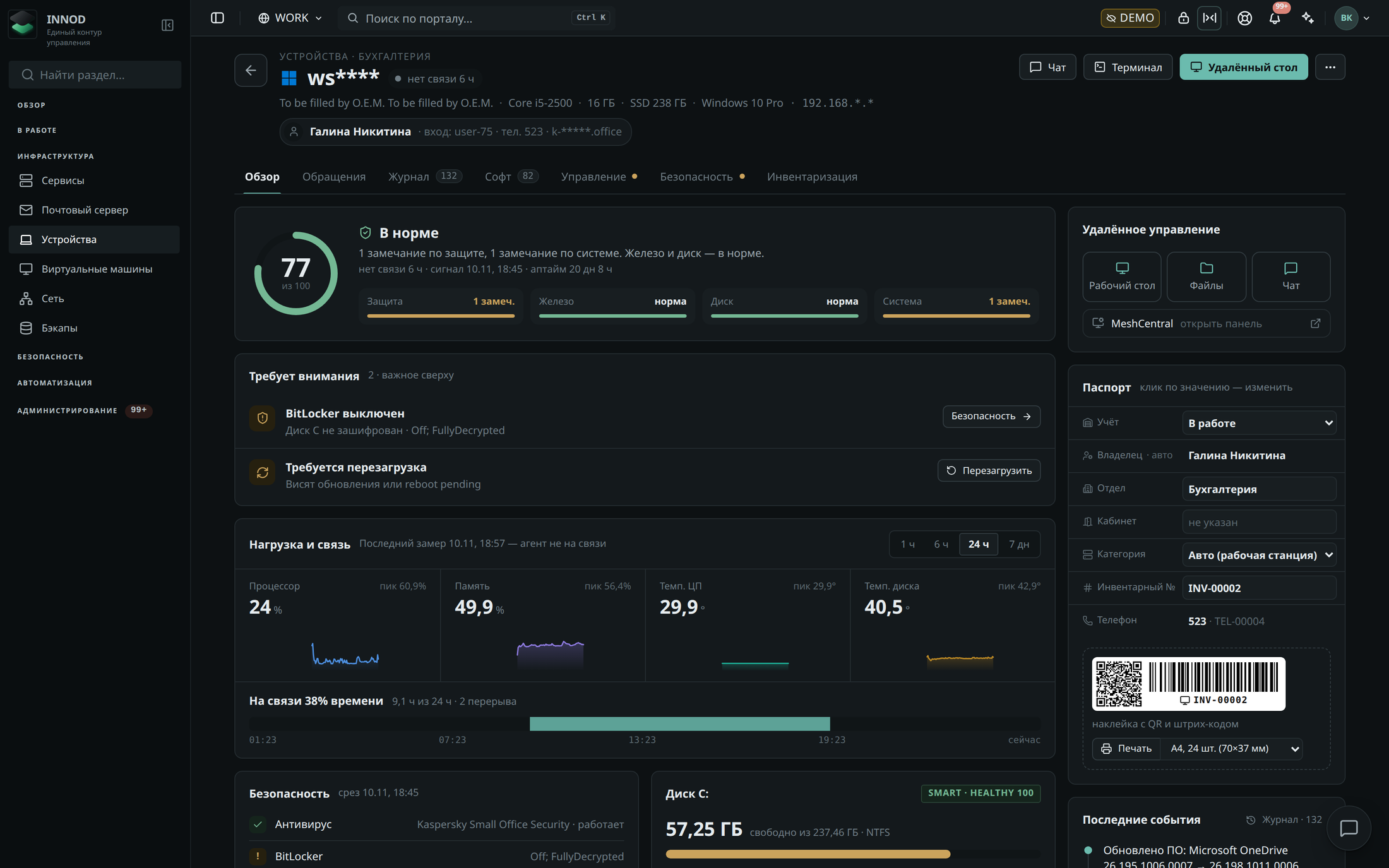
Computer card
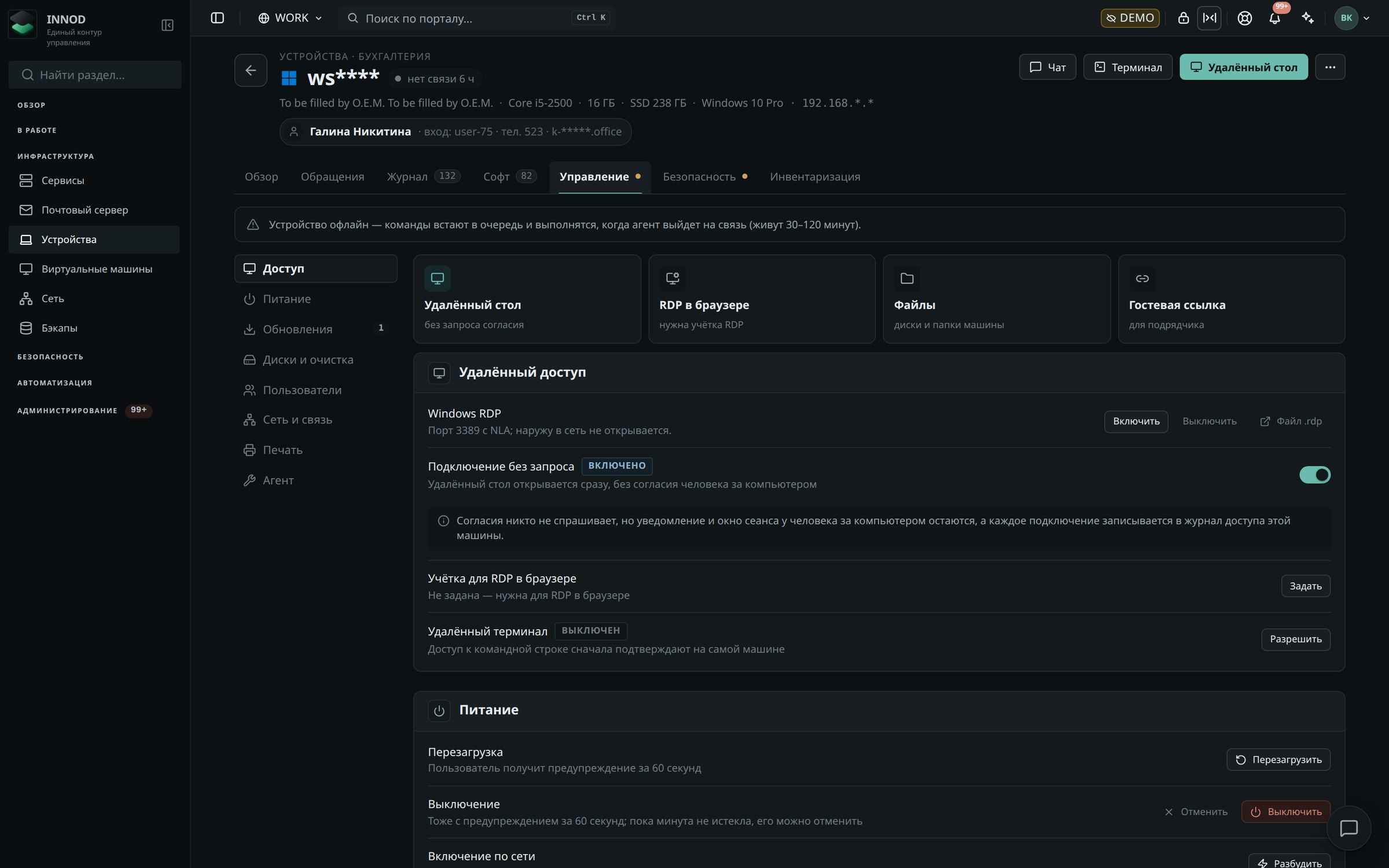
Remote access
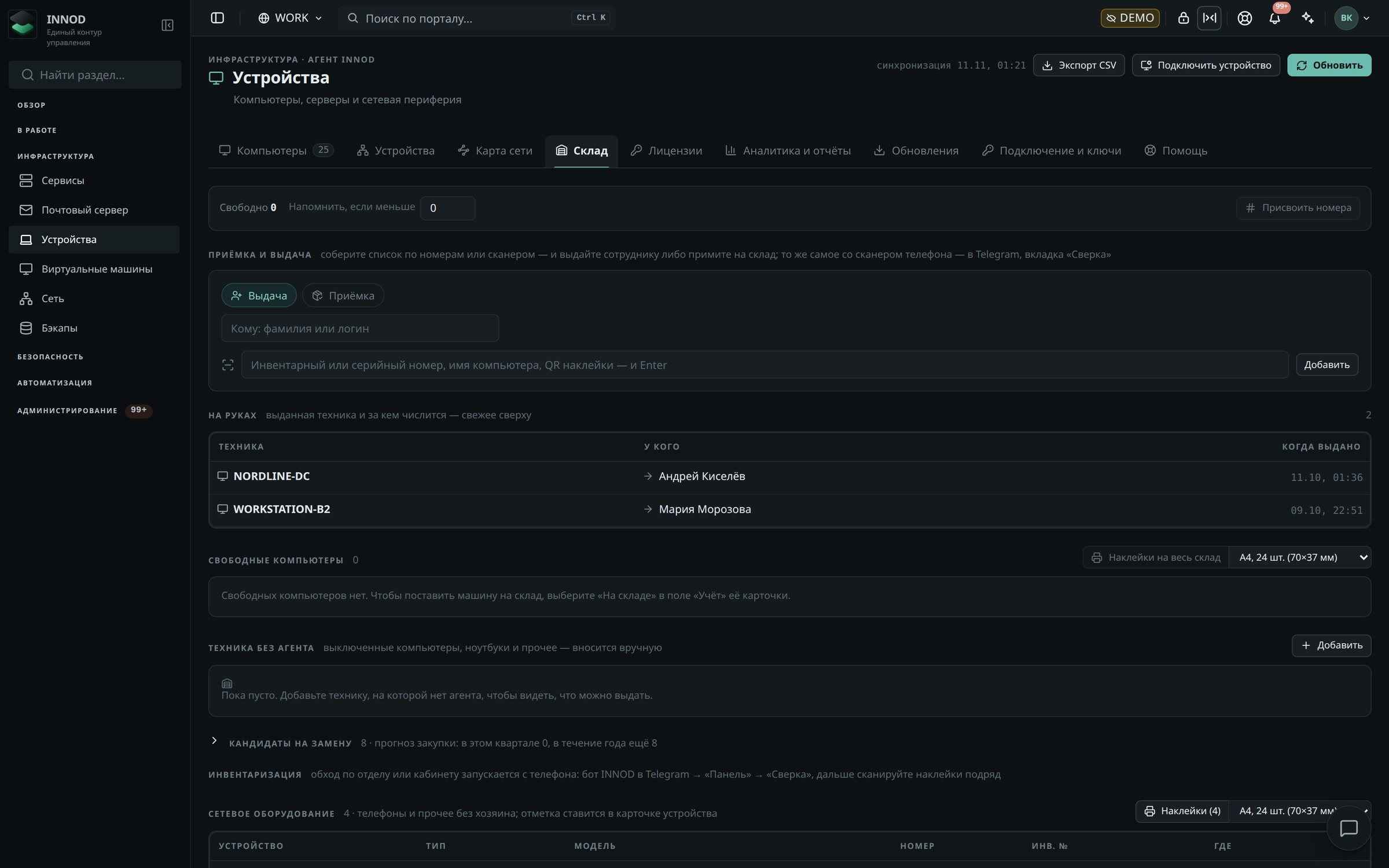
Warehouse and stocktaking
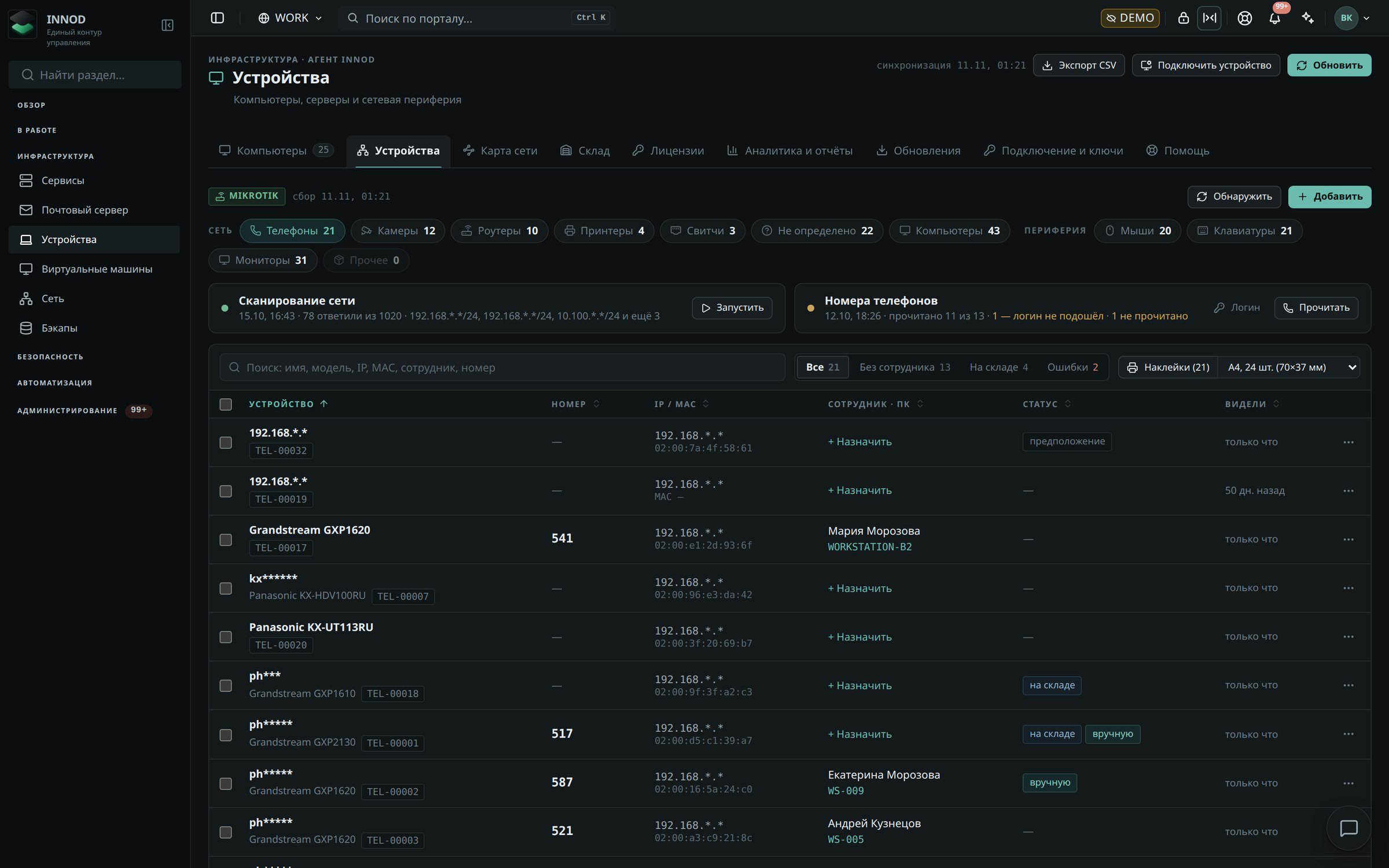
Network devices and map
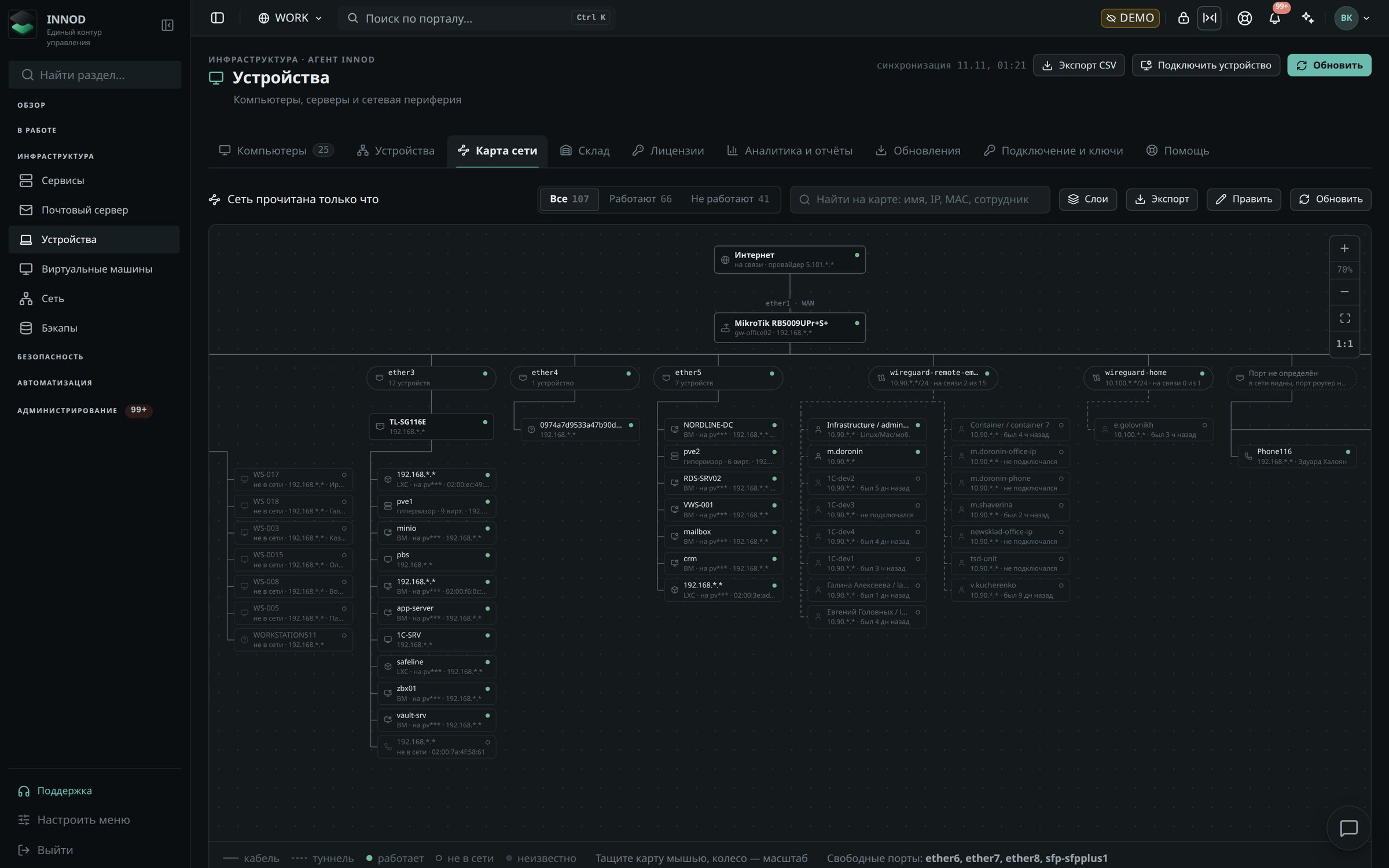
Network devices and map
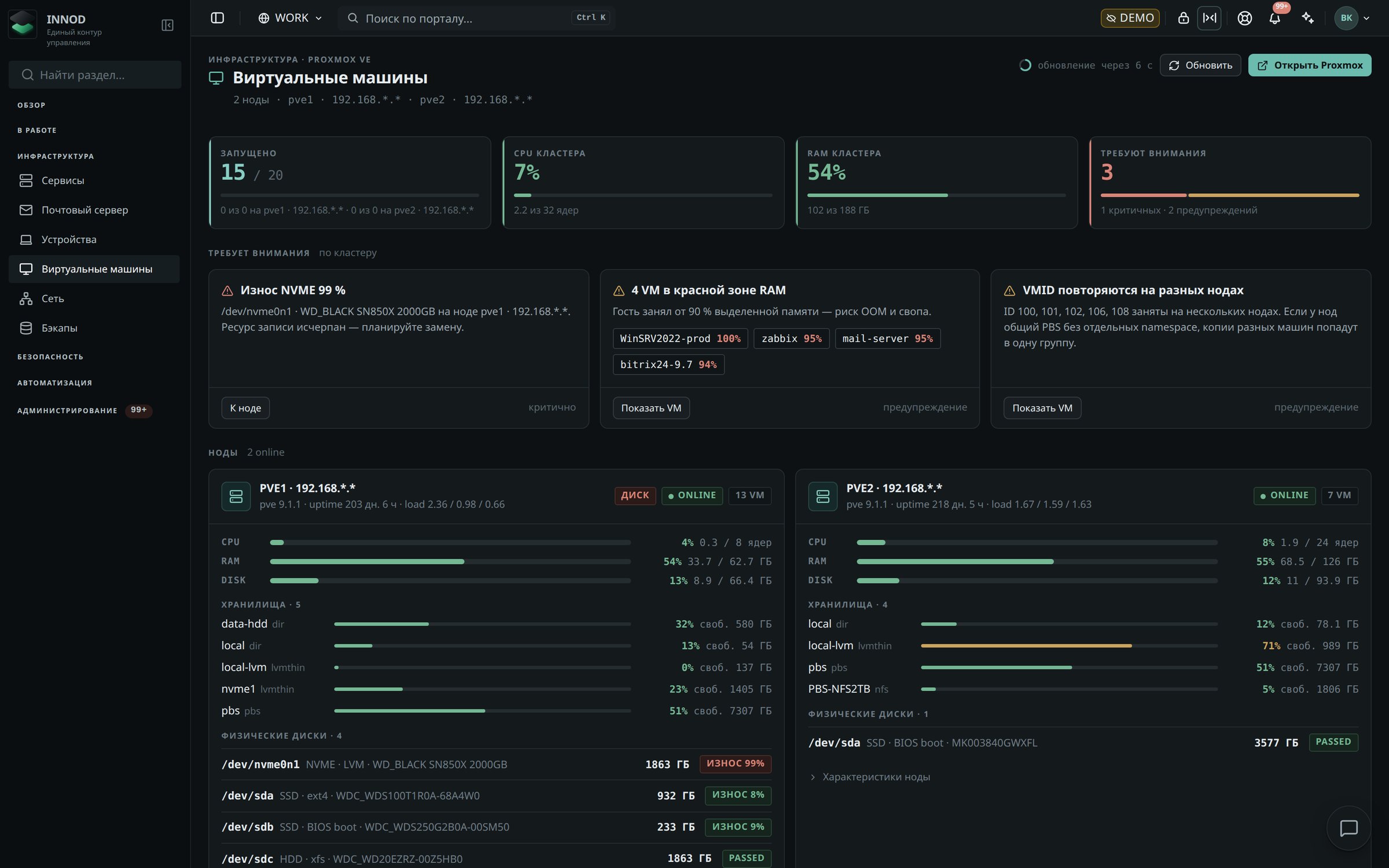
Virtual machines
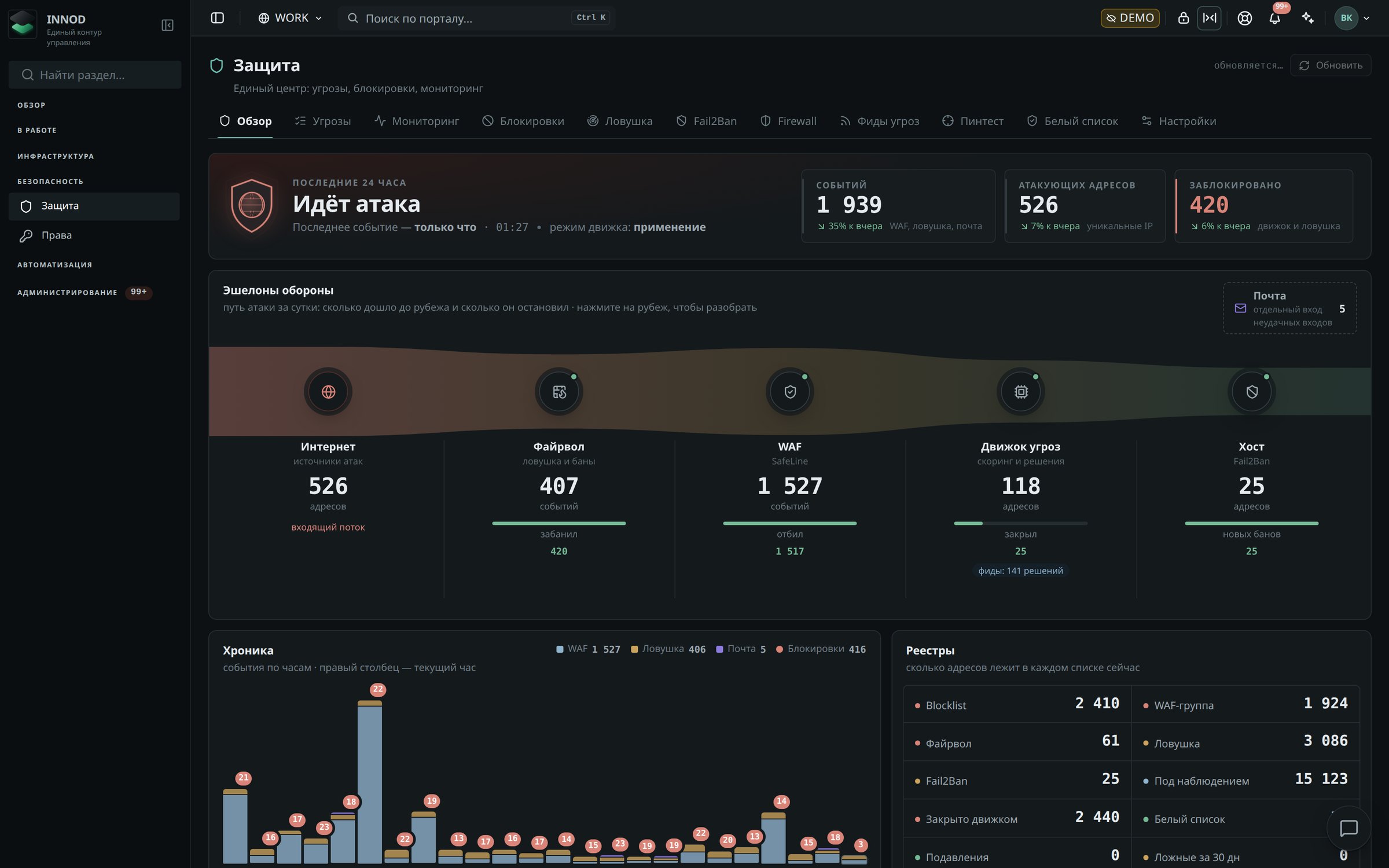
Defence overview
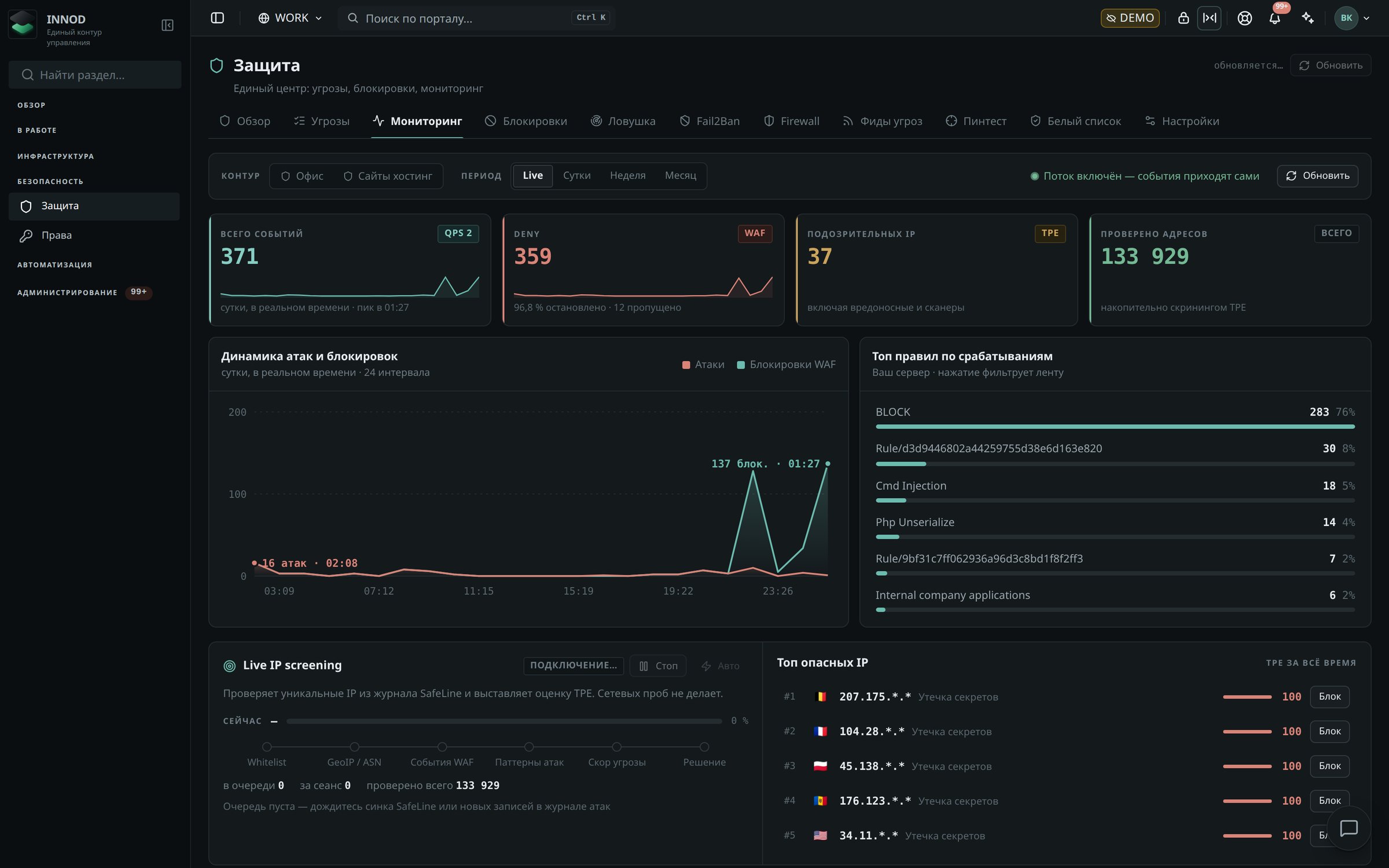
WAF monitoring
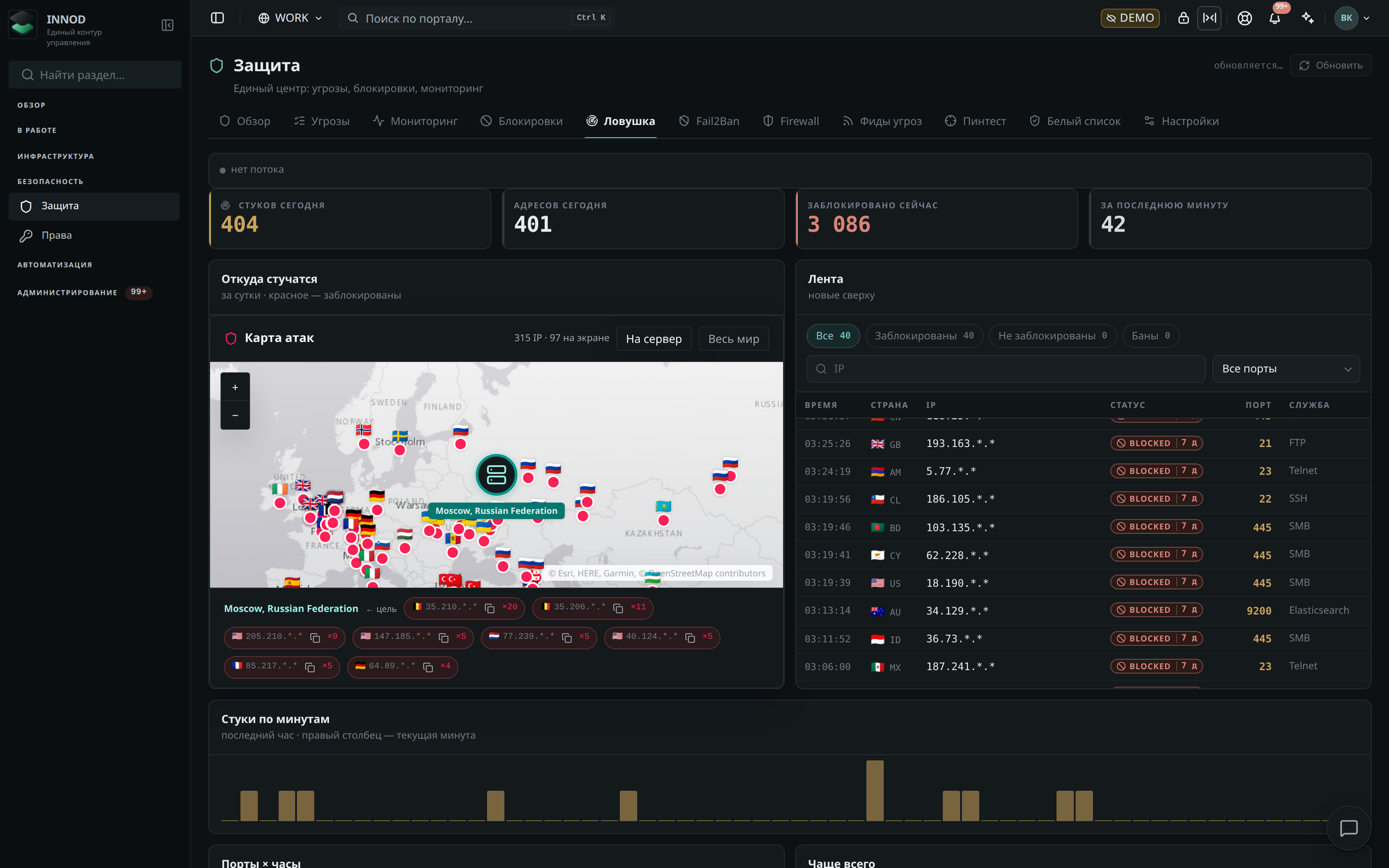
Router honeypot
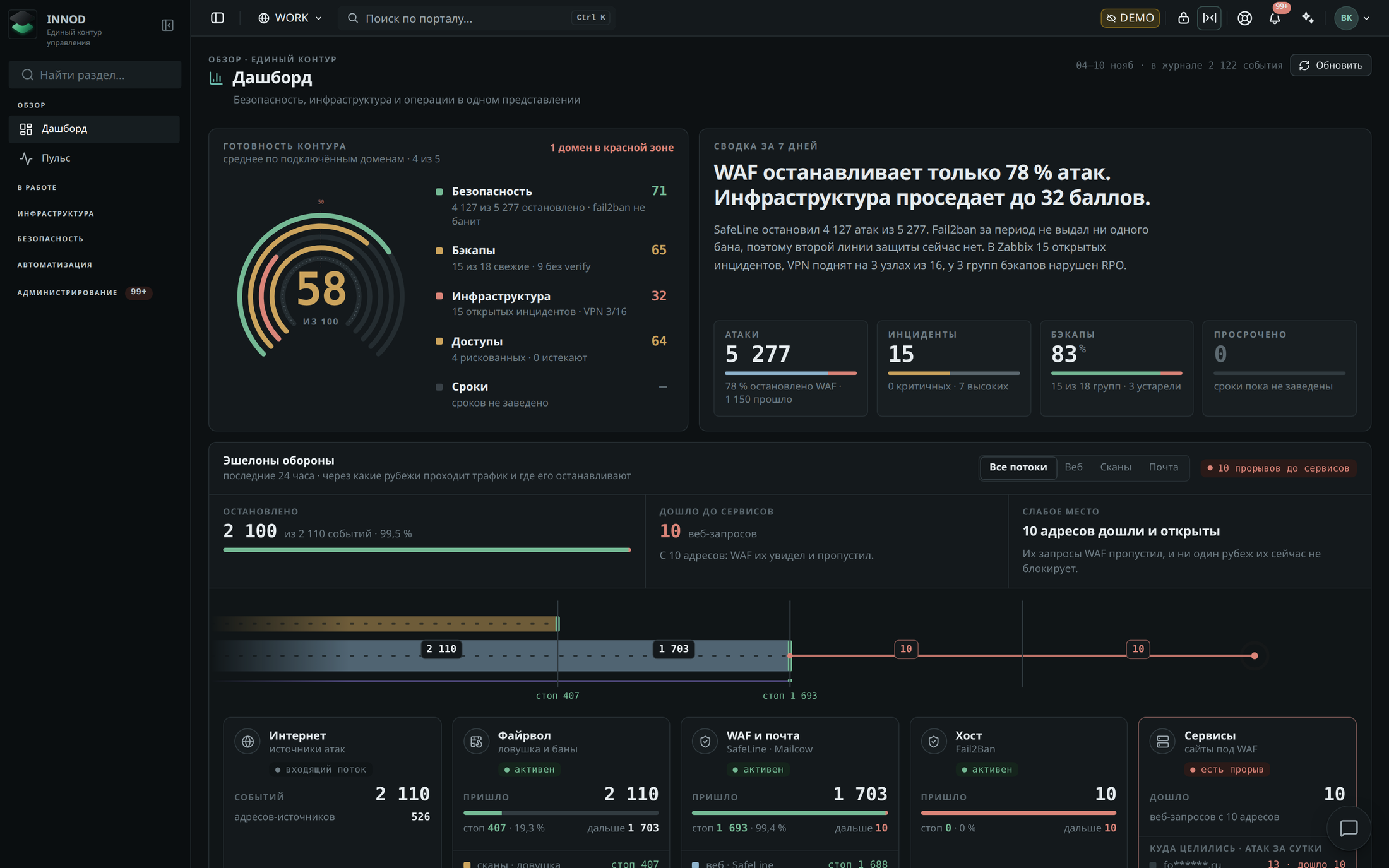
Infrastructure overview
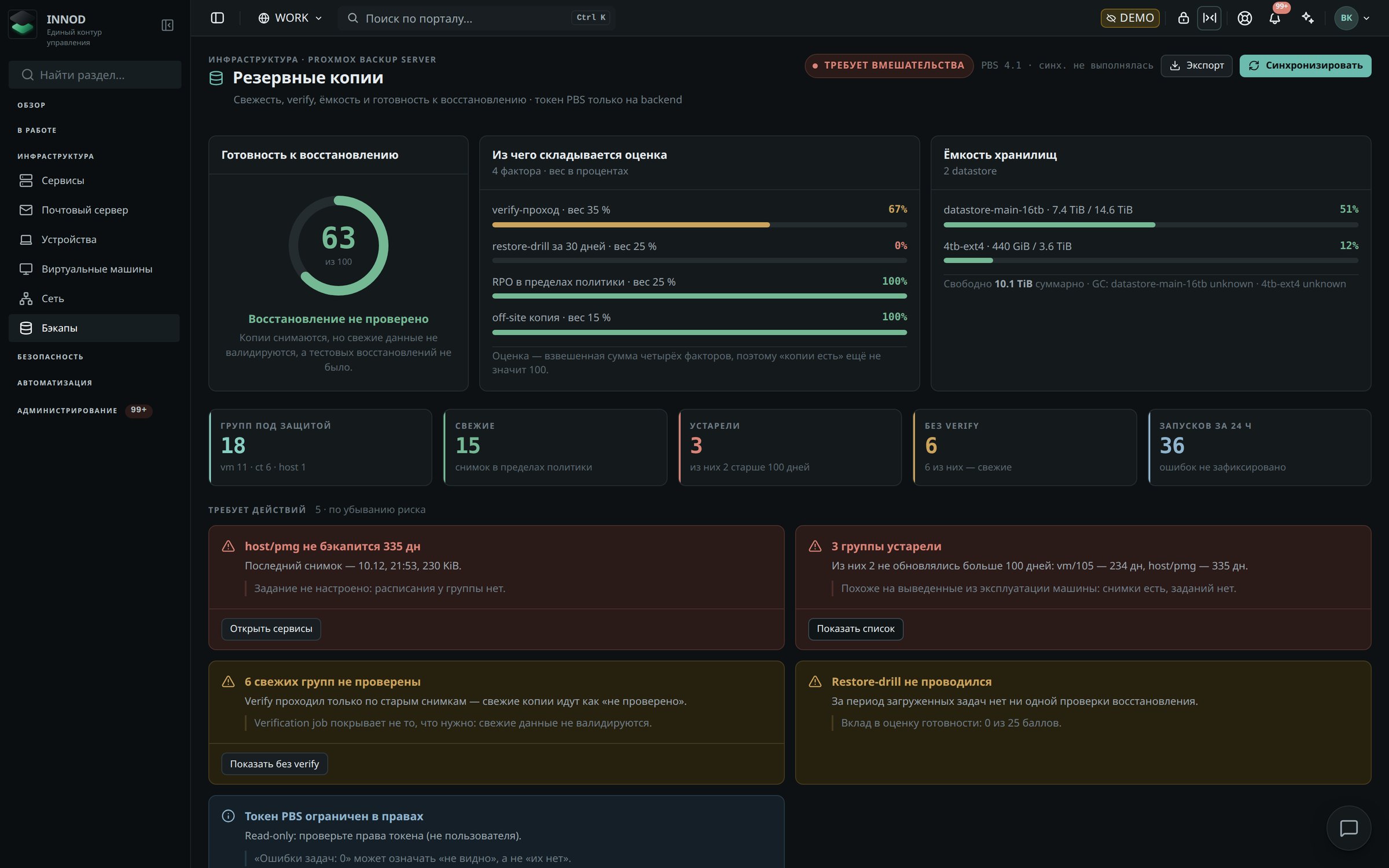
Backups
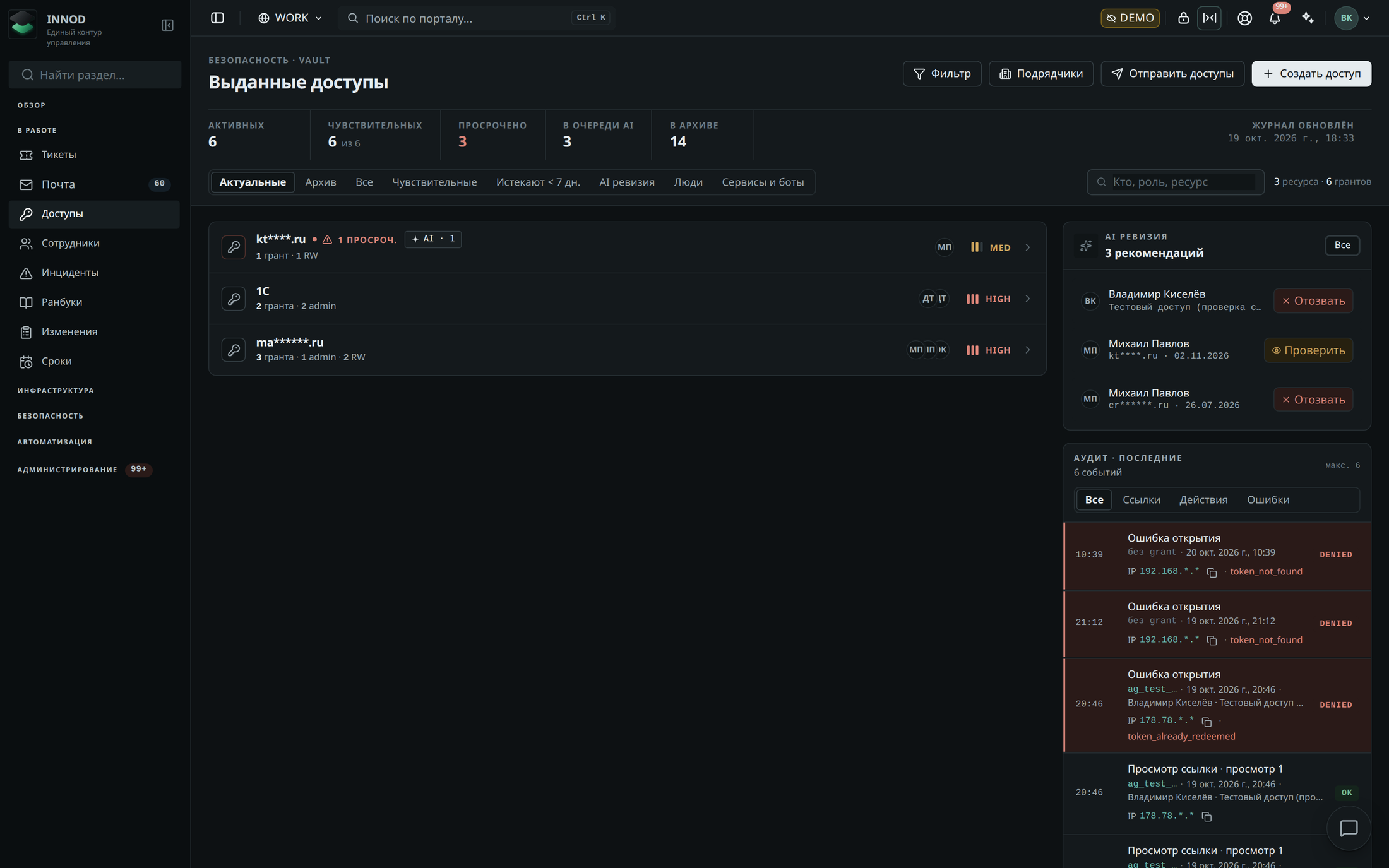
Access vault
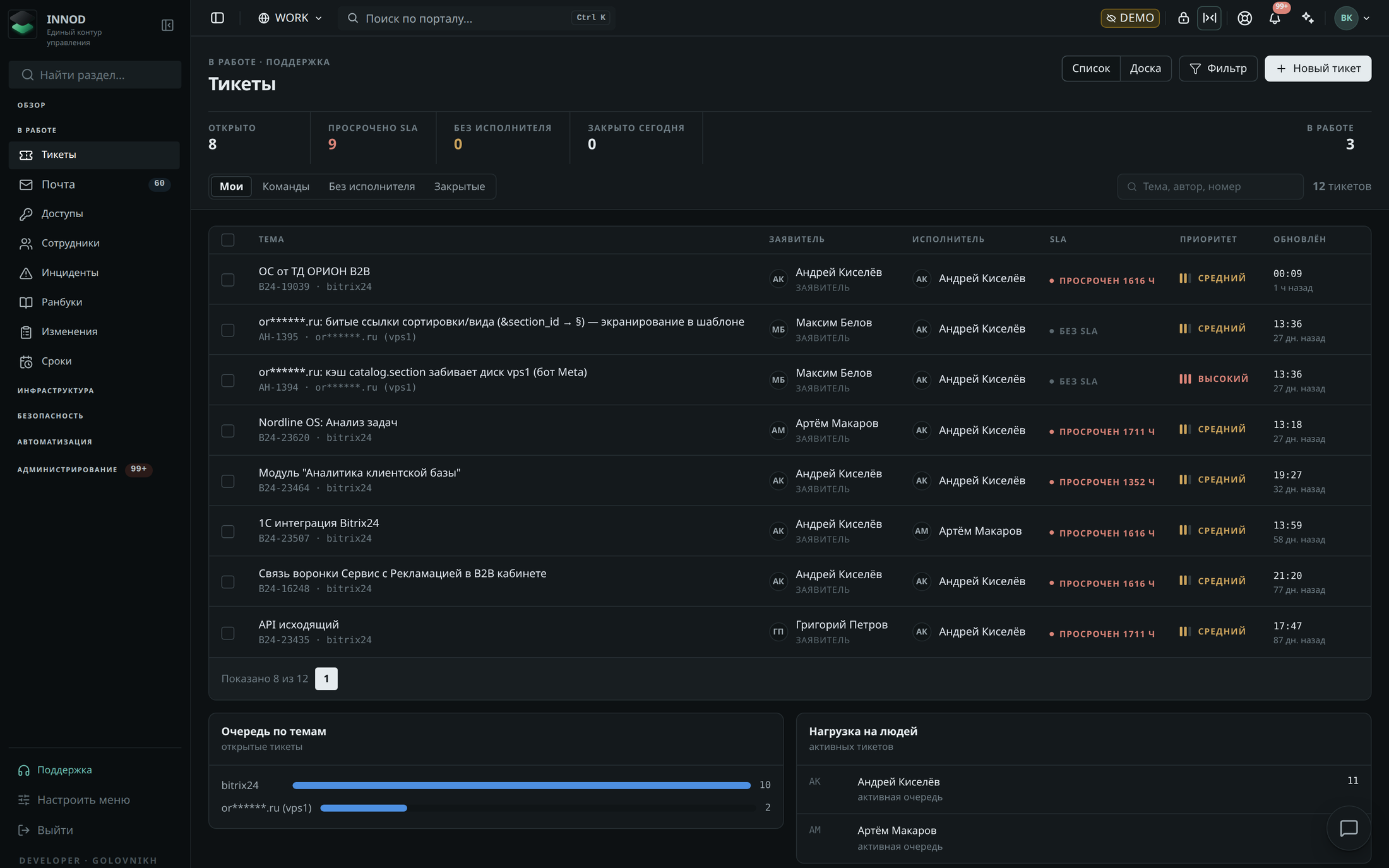
Tickets
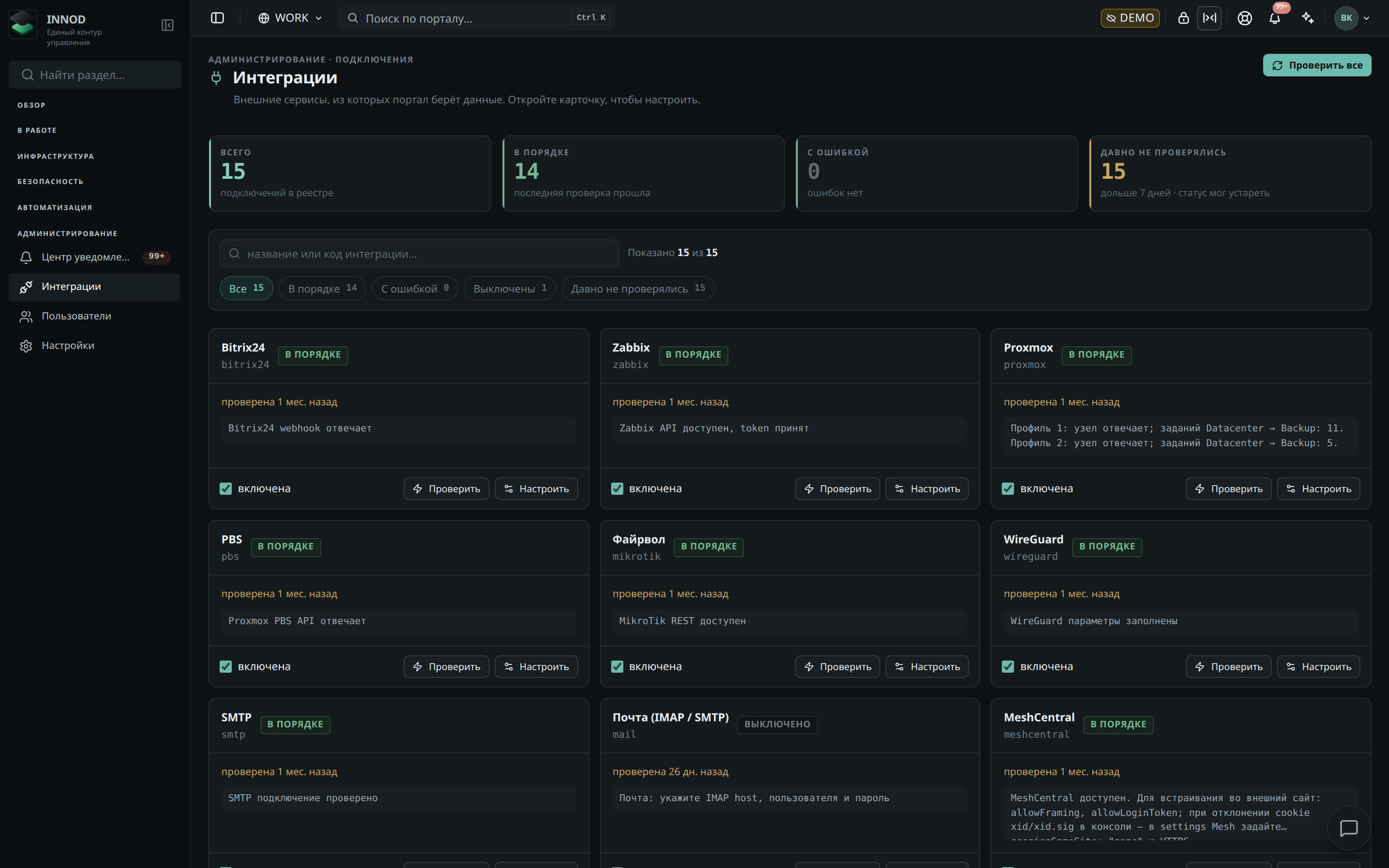
Integrations
Every section of the app
Computer fleet7
Every machine with the agent and its state
- Search by name, user, IP, CPU and department, plus “Needs action” filters
- Load, temperature, free disk space and connectivity in one table
- “Fleet health” and what lowers each machine’s score
- Loss of connectivity is detected within minutes via regular agent signals
- Shows who is connected to the machine remotely, how and from where
- Bulk messages and maintenance notices with a countdown for employees
- Printable reports and a PDF summary of all machines by department
Computer card7
The machine’s passport and controls
- Real-time metrics, disk SMART, top processes and charts for an hour, a day and a week
- Reboot and shutdown with a warning, Wake-on-LAN via a neighbouring computer
- Local accounts, password changes and temporary admin rights confirmed in Telegram
- Installing and updating software via winget, Windows updates step by step
- Disk cleanup with or without asking the user, printer and print queue status
- Ping and traceroute from the machine itself, renaming in the domain
- Event, command and access logs, a PDF passport and an asset label
Remote access6
Screen, RDP, terminal and files via the server
- Remote desktop in the browser, with user consent or unattended if allowed on the machine itself
- The sign-in screen and UAC are visible; Ctrl+Alt+Del, session and monitor selection work
- Two-way clipboard and typing a long password from the clipboard
- RDP in the browser: the password is stored encrypted and never reaches the browser
- A cmd and PowerShell terminal, every command logged
- Browse folders, download and upload files
Contractor access5
A temporary link to one or more machines
- The link is shown once; only its hash is stored
- Screen, a user session, RDP, terminal or a file exchange folder
- View-only mode, a day-and-hour schedule and country restrictions
- Every sign-in approved by an admin in Telegram
- Revoking the link terminates the active session immediately
Chat and support requests5
Messaging with the computer’s user
- An “INNOD Support” shortcut creates a numbered request
- Attachments, reactions, delivered and read receipts
- Hidden transfer of login and password, automatically deleted on both sides when expired
- Pause and “Resolved”, time to first reply and to resolution
- Help requests with a screenshot and priority straight from the agent
Warehouse and stocktaking7
Hardware in stock, assigned to employees and in repair
- Issue and return, assignment history, repairs and write-offs
- Automatic numbering and labels with a QR code and barcode
- Handover and write-off forms covering the full kit
- Monitors are recognised by serial number on any machine
- Reminders for warranty expiry and minimum stock
- Reconciling records with agent data and replacement candidates by wear
- Walking the office with a phone in Telegram: a label scanner and a found / missing report
Licences4
Purchased versus installed
- A register of purchased licences with encrypted keys
- The agent automatically detects Windows and Office keys and licence types
- Automatic matching by key suffix and manual linking for subscriptions
- The full key is revealed by a separate request that is logged
Server and network updates5
Installed and available versions
- Windows and software on workstations with bulk install
- Docker stacks, Mailcow, SafeLine and apt packages on Linux servers
- Image freshness is checked against the registry and new releases are tracked automatically
- RouterOS updates: backup, install and version check
- The server cannot update a Linux machine until it is allowed on the machine itself
Network devices and map4
Printers, phones, routers and cameras
- Device discovery from router tables and subnet scanning
- Type detection by protocols and model signatures
- IP phone numbers linked to employees
- A network map from ports and switch tables with a floor plan
Virtual machines3
Proxmox VE without opening its console
- VMs and containers by node with load charts
- Start, stop, pause, snapshots and cloning from a template
- Backup jobs and the latest backup
Connecting machines3
Rolling the agent out to the fleet
- Fleet-wide rollout with a single file via group policy
- Connecting a single machine by code with admin approval
- MSI, exe and a Linux binary; tokens are stored only as hashes
Fleet analytics2
Power, wear and composition
- A power score for each machine and what limits it
- A replacement queue, OS and agent versions, the busiest machines
Defence overview4
Every line of defence on one screen
- Events, attacking addresses and blocks for the day, compared with yesterday
- Defence layers: how much got through and was stopped at each one
- Attack sources, methods, objectives, targeted sites and geography
- A decision log: who blocked an address, where and why
Threat policy engine5
A decision on every address, with an explanation
- 25 signals: sensitive paths, attack chains, deny spikes, AI-agent probes, mail login brute force
- Threat class: scanner, exploit, brute force, secrets harvesting, bot, noise
- Score breakdown and an attacker profile
- Re-score, suppress for 24 hours, mark as false positive, unblock everywhere
- Observe, simulate and enforce modes for a safe rollout
WAF monitoring4
SafeLine logs in real time
- Attack map, trends and top triggered rules
- An event feed with grouping and behavioural filters
- Bulk actions: to the WAF, the router or fail2ban
- A separate panel for mail attacks by protocol
Router honeypot3
Connection attempts to closed ports
- The router blocks sources automatically; the panel reads its log every 5 seconds
- A map of connection sources, ports by hour and top countries
- A ready-made router setup script in the tab
Blocks and whitelist4
One blacklist and one whitelist
- Router blocks for 2 hours, a day, a week or permanently
- Fail2ban on several servers in a single action
- Reconciliation removes blocks that no longer exist on devices
- A whitelist of addresses and domains excluded from all blocking
Threat feeds4
Public attack databases as rules
- OWASP CRS, CrowdSec, Nuclei and the CISA known exploited vulnerabilities catalogue
- Rules are tested against legitimate traffic before going live
- Rule set versions with rollback and an observe mode
- “Test a request” with no side effects
Pentest scanner4
A custom website vulnerability scanner
- About 50 checks: injections, headers, TLS, DNS and mail, leaked secrets, outdated libraries
- Scans only allowed domains, with load limits and a kill switch
- Authenticated checks and checks for blind vulnerabilities
- Scan comparison, finding retests and an emailed report
Mail server4
Mailcow security and management
- Tells password guessing apart from probing and certificate errors
- Targeted mailboxes and attack sources
- Quotas, forwarding, send limits and app passwords
- Mail logs with convenient filters
VPN and network rules3
WireGuard and firewall on MikroTik
- Issuing access with a role, expiry and a QR code
- Connection status, traffic and a connection map
- Scheduled AI audit of firewall and NAT rules
Securing the panel itself4
Permissions, sign-in and sessions
- Four roles and about 45 permissions, enforced on the server
- 2FA, sign-in confirmation in Telegram and IP restrictions
- Risky actions confirmed in Telegram
- Active sessions with geolocation and termination
Infrastructure overview3
Readiness of the whole infrastructure as a single metric
- A score across five areas: security, backups, infrastructure, access, deadlines
- A “Needs action” list linking to each section
- Public service availability and certificates
Services3
A service catalogue with owners and dependencies
- State from Zabbix, certificates and web checks
- Technical and business owners, criticality and dependencies
- Linked runbooks, changes and backups
Incidents4
From a monitoring event to the post-mortem
- Events are grouped on a “one cause, one row” basis
- Stages from detection to review, an owner and a timeline
- Noise suppression rules that require a reason
- The post-mortem is generated automatically, AI prepares a draft, Markdown export
Changes and runbooks3
A change log and a runbook library
- Reason, impact, commands, verification and rollback for every change
- Highlighting risky commands by configurable rules
- Runbooks with a step-by-step mode and staleness flags
Backups3
Coverage and restore readiness
- Proxmox Backup Server datastores, groups and tasks
- Fresh, stale and unverified backups
- A restore-readiness score for each service
Deadlines3
Expiry tracking
- Certificates, domains, licences, tokens and scheduled maintenance
- Several owners and renewal cost
- Email reminders in advance, on the day and after expiry, without duplicates
Notifications and log3
One event feed for every module
- Deduplication, take ownership, resolve, snooze
- Mute rules and creating a ticket from a notification
- A platform log with live security events
Employees5
Onboarding and offboarding in a single operation
- An AD account, mailbox, VPN and Bitrix24 department on hiring
- Blocking all accounts and forwarding mail on departure
- Step-by-step process status with retry for failed steps
- The password arrives by a link with a confirmation code that opens once
- Hardware assigned to the employee in their card
Access vault4
Who has access to what, and until when
- An access wizard and templates
- Revoke, extend and review with an email to owner and recipient
- Risk scoring and an AI review without sending secrets
- A one-time link with a limited validity period that records scanners and repeat openings
Contractors2
A directory of external companies
- Importing companies from Bitrix24 without duplicates
- Linking issued access to a contractor
Tickets4
Support on top of Bitrix24 tasks
- Two-way work with tasks, comments and checklists
- Live updates, unread counter and a board view
- An AI assistant: summary, first checks and a draft reply
- Links to a service, access, incident and change
Mail2
A mail client inside the panel
- Several mailboxes, folders, labels and templates with variables
- An email can become a ticket, incident or access grant
Telegram3
A bot and a mini app
- Commands: defence status, attacks, who is online, wake, reboot, block
- A mini app with the machine list and stocktaking
- Sign-in and risky actions approved in the bot
Integrations3
15 connections with health checks
- Bitrix24, Zabbix, Proxmox VE and Backup Server, MikroTik, WireGuard
- SafeLine, fail2ban, Mailcow, Active Directory, MeshCentral, mail and Telegram
- Secrets are encrypted; every integration has a “Check” button and a change log
Spaces3
Several isolated copies of the panel
- Each space has its own database, settings and users
- The gateway picks a space by host name and stores no secrets
- One Telegram bot for all spaces
Agents5
A custom Go agent for Windows and Linux
- A Windows service with a tray icon and an MSI installer
- Reports hardware, disks, protection, software, logs, monitors, printers and licences
- Self-updates with signature checks and a watchdog that restarts a hung service
- YARA and vulnerable driver checks every two hours
- The Linux agent is read-only until more is allowed on the machine itself
A few more screens
How automatic defence works
Three event sources
SafeLine WAF logs, failed mail logins and router honeypot hits are merged into one stream.
A score for every address
25 signals, an attack class and indicators from public threat feeds produce a 0 to 100 score and a confidence level.
Graduated response
From observation to a network-wide block. Each repeat violation extends the block: a day, then a week, then permanently.
Safeguards
A whitelist, manual suppression, a simulation mode and a cap on mass blocks prevent blocking the company’s own users and addresses.
Five blocking channels
The WAF, the MikroTik router, fail2ban on every server, the mail blacklist and an internal registry. Each shows whether it worked.
Feedback loop
Reconciliation removes stale blocks, false positives are shown on a chart, and a sudden rise in noise triggers an alert.
Under the hood
An agent with no inbound ports
The Go agent initiates outbound HTTPS connections to the server. Allowed hosts are embedded at build time and updates are signature-checked.
Secrets stay on the server
The browser never talks to external systems. Integration passwords are AES-256-GCM encrypted and certificates are pinned.
Risky actions confirmed in Telegram
Sign-ins, temporary admin rights and risky commands require confirmation in Telegram. 2FA and IP-restricted sign-in are also available.
Isolated spaces
Several independent copies of the panel behind one gateway. Each has its own database and users; the gateway stores no data or secrets.
Six months of development, one developer and over a thousand commits: the IT team manages computers, security and services from a single interface. I can build a similar platform for your infrastructure.
Evgeniy Golovnikh
Stack
Frontend
- React 19
- TypeScript
- Vite
- Tailwind CSS
- Zustand
- Recharts
Backend
- Node.js
- Express
- SQLite
- Redis
- WebSocket
- SSE
Agents
- Go
- WiX MSI
- WebView2
- YARA-X
Integrations
- Zabbix
- Proxmox
- MikroTik
- SafeLine WAF
- Mailcow
- Bitrix24
- Active Directory
- Telegram
Quality & delivery
- Playwright
- systemd
- nftables
A similar task?